Follow your projects on the Projects screen
In a project team, the Projects screen shows each project's progress, milestones, tasks delivered on time and contributors.
The Projects screen gives one card per project of your tool's scope, so the whole team sees how each project moves forward.
Who it's for
Everyone in a project team · Free plan
Open it
In the side menu, click Projects.
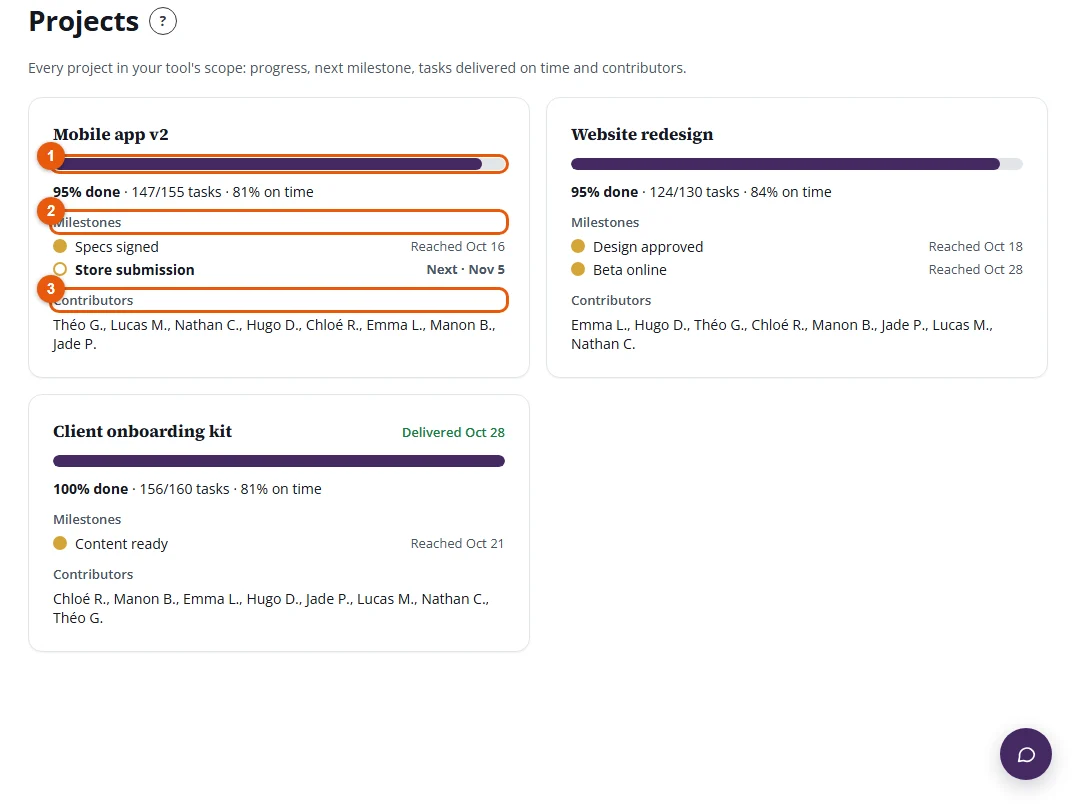
What each card shows
- Progress: the share of the project's tasks that are completed ("67% done"), the number of completed tasks out of the active tasks, and the share of dated tasks delivered on time. The due date, or the delivery date, is at the top right.
- Milestones: in planned order, golden once reached. The next milestone is in bold with its date.
- Contributors: the members who completed at least one task of the project.
Good to know
- With the Racing and Grand Prix themes, progress is shown as a track: the milestones are the checkpoints, and the car moves forward with the project.
- Deleted tasks and tasks moved out of scope do not count in progress.
- Click a project's name to open it in your project tool.