How to change a project team's scoring rules
Turn each project rule on or off and choose its points: tasks, bonuses, milestones, delivered projects, kudos. Fair play rules always apply.
A project team earns points from its project tool. You set the rules in the setup wizard, then change them at any time in the settings.
Who it's for
Managers · Free plan
Steps
- Open Manager Area and scroll to Settings > Scoring rules.
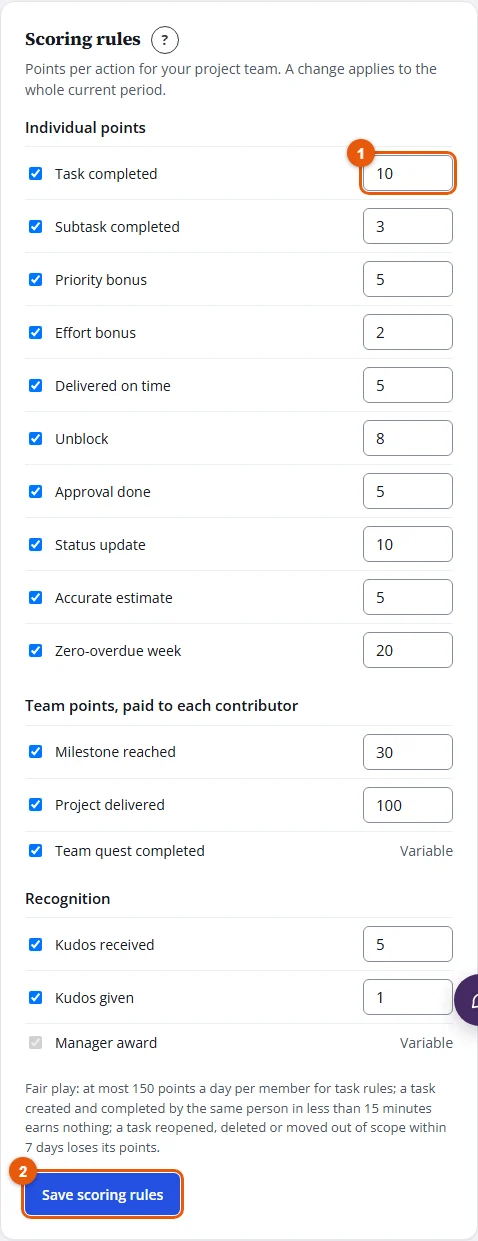
- For each rule, tick it to turn it on and type its points (0 to 500). The rules are grouped into Individual points, Team points, paid to each contributor and Recognition.
- Click Save scoring rules.
Result
"Saved." confirms it. The new rules apply to the whole current period: the leaderboard and each member's journal are recalculated.
Good to know
- Two rules have variable points: team quests (the reward set for each quest) and manager points (the points you award).
- Fair play: at most 150 points a day per member for task rules; a task created and completed by the same person in less than 15 minutes earns nothing; a task reopened, deleted or moved out of scope within 7 days loses its points.
- Closed competitions keep their final results.
- A rule that needs a field your tool does not provide (priority, effort…) stays off.