How to view past competitions
Look back at every closed competition: dates, winners, final standings, rewards and the ceremony replay.
Every closed competition is archived. Past competitions keeps the final standings exactly as they were at the closing, so anyone can check who won, with how many points, and replay the ceremony.
Who it's for
Managers and sales reps · Paid plan
Before you start
- You are signed in, as a manager or a sales rep.
- At least one competition has closed. Until then, the page says "No competition has closed yet. Final standings and winners will appear here."
Steps
- Click Past competitions in the top menu.
- At the top, read the Current competition and its closing date.
- Under Closed competitions, find the one you want. Each shows its dates and its winners.
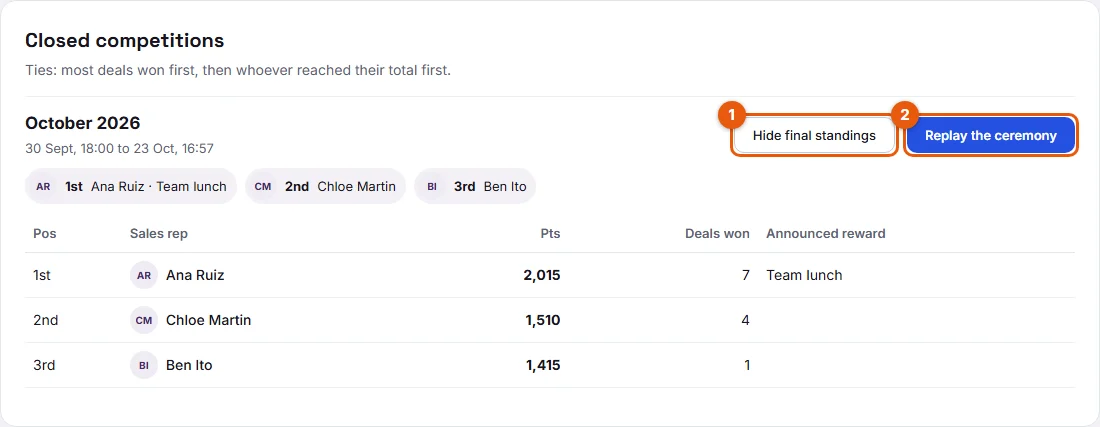
- Click See final standings (1 on the screenshot). The table shows each rep's position, name, points, deals won and reward.
- Click a rep's name to see how they earned their points in that competition.
- Click Replay the ceremony (2) to watch the closing ceremony again, in full screen.
Result
You see the final standings as they were frozen at the closing. Click Hide final standings to fold the table again.
Good to know
- Final standings never change after the closing, even if a late action arrives afterwards.
- The tie rule is written above the list: "Ties: most deals won first, then whoever reached their total first."
- You can replay a ceremony from here as often as you like.
- Past competitions are announced as part of the paid plan ("full history"). Today, no plan limit is applied in the app and nothing is charged.
FAQ
I missed the ceremony. Can I still see it?
Yes. Click Replay the ceremony on the competition.
Why does my total here differ from the Month tab?
A competition has its own dates, and late actions count in the competition open when they arrive. The Month tab counts each action on its own date.
Can I export the final standings?
No, there is no export today.