How to see a colleague's performance
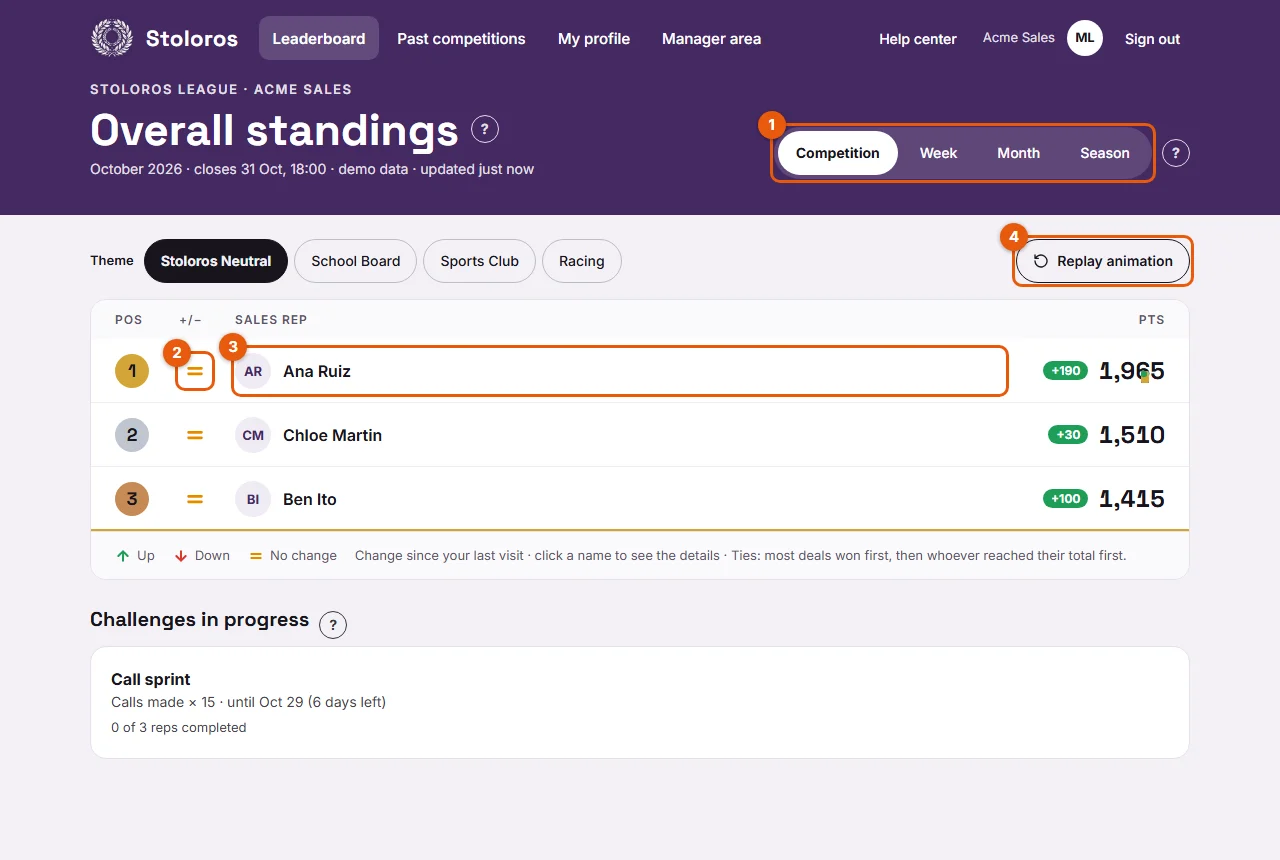
Click a name on the leaderboard to see how that rep earned their points, action by action.
Points in Stoloros are transparent. Anyone in the team can see how a colleague earned their points, with the same detail as their own.
Who it's for
Sales reps and managers · Free plan
Before you start
- You are signed in and on the Leaderboard.
Steps
- On the Leaderboard, choose the period with the tabs (1).
- Click the colleague's name (3), for example Ben Ito.
- The Individual performance page opens. It shows the colleague's total and rank, their Points breakdown and their Action log.
- To come back, click Back to the leaderboard.
Result
You see the same view as My performance, for your colleague: each action, its value, and the total.
Good to know
- The page uses the period selected at the top. Switch tab to see the colleague's week, month, season or current competition.
- The rules are the same for everyone, so you can compare line by line.
- Manager awards are visible too, with their reason and note.
- From Past competitions, click a name in the final standings to see that rep's performance for that competition.
- Managers use the same click to check a rep's activity.
FAQ
Can my colleagues see my action log?
Yes. Every member of the team can open any leaderboard member's performance. Only the actions needed for points are shown, such as the action type, its date and the deal or task name.
Why does a name not open anything?
The name is clickable only on the live leaderboard. Previews of the leaderboard, for example in the settings, are not clickable.