The closing ceremony
Choose when the ceremony is shown to the team, and what everyone sees: winners revealed one by one, then the podium.
When a competition closes, Stoloros plays a full-screen ceremony: the winners arrive one by one with their animation, then the podium. The manager chooses when it is shown; each member sees it once.
Who it's for
Managers and sales reps · Free plan
Before you start
- A competition has closed, on schedule or by hand.
- The manager has set the winners and rewards in Rewards and ceremony.
Steps
Choose when the ceremony is shown (manager)
- Open Manager area and scroll to Settings > Rewards and ceremony.
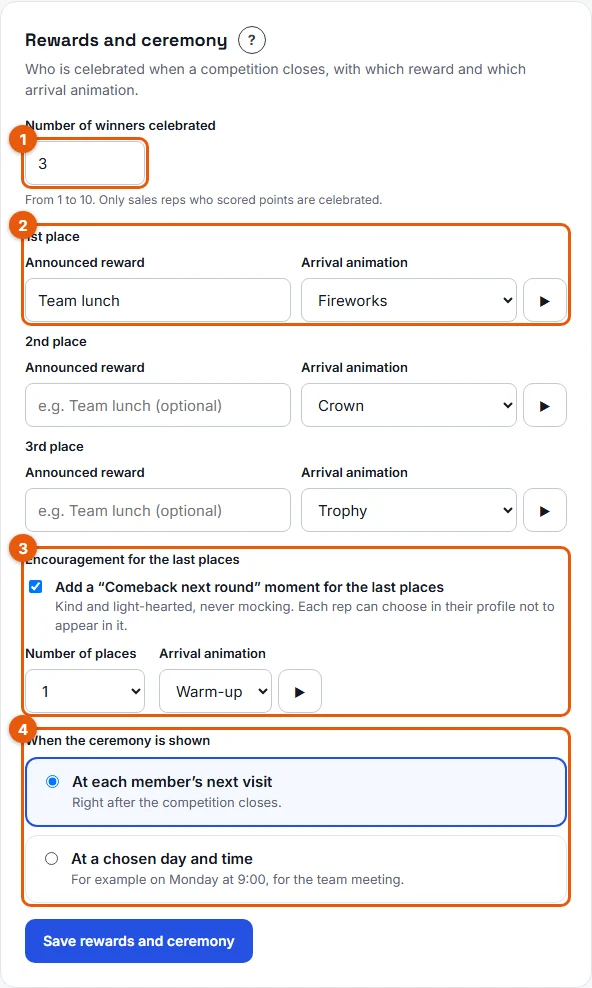
- Under When the ceremony is shown (4 on the screenshot), choose:
- At each member’s next visit (default): right after the competition closes.
- At a chosen day and time: pick the Day and Time, for example Monday at 9:00, for the team meeting.
- Click Save rewards and ceremony.
Watch the ceremony (everyone)
- Open Stoloros after the closing (or after the chosen day and time). The ceremony starts on its own, in full screen.
- Watch the scenes: the competition title, the Comeback next round moment if the manager turned it on, then each celebrated place from the last one up to 1st, each with its animation. Confetti falls for the 1st place.
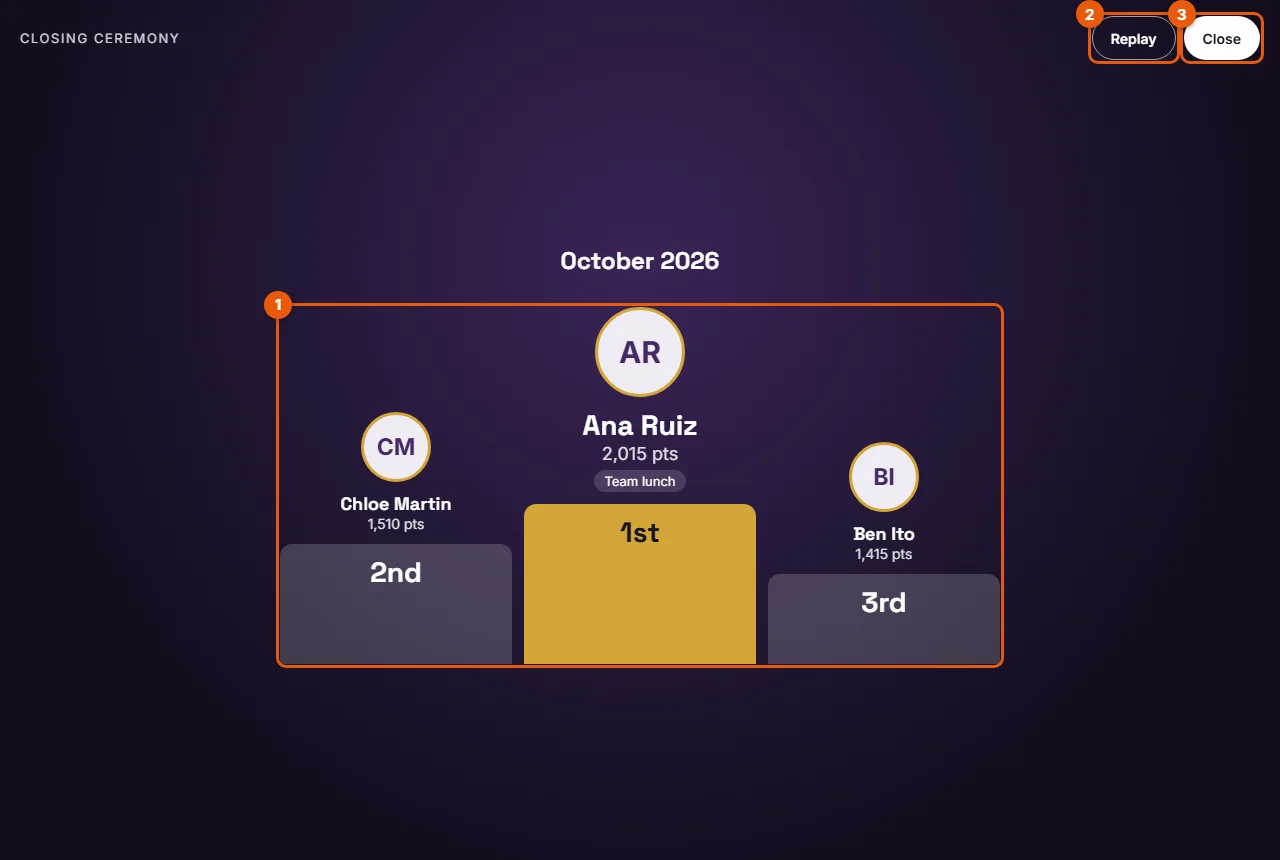
- The Podium (1 on the screenshot) shows each winner's avatar, name or nickname, points and reward.
- Use the buttons at any time: Skip goes straight to the podium, Replay (2) starts again, Close (3) or the Escape key ends the ceremony.
Result
Once you close it, the ceremony is marked as seen for you and does not come back on its own. You land on the leaderboard, where the new competition has already started.
Good to know
- Each person sees the ceremony once: the reps in the final standings, and the managers.
- A manager who closes a competition by hand sees the ceremony right away.
- Only the latest closed competition is shown. If two competitions closed while you were away, you see the most recent one.
- To watch it again, open Past competitions and click Replay the ceremony.
- If your device is set to reduce motion, the ceremony shows the podium directly, without animation.
- If nobody scored points, the ceremony says so: "No points were scored in this competition. The next one has started!"
FAQ
The competition closed but I saw no ceremony. Why?
It may be scheduled for a later day and time, you may have seen it already, or you joined after the closing. See The ceremony was not shown.
Can we watch it together on a big screen?
Yes. Choose At a chosen day and time to match your team meeting, then on the meeting-room screen open Past competitions and click Replay the ceremony. Members who were not there still see it at their next visit.
Is there sound?
No. The ceremony is visual only.