How to connect Brevo
Paste a Brevo API key so that your team's deals, tasks and notes start earning points.
Stoloros reads your team's activity in Brevo and turns it into points. You connect it once, with an API key from your Brevo account.
Who it's for
Managers · Free plan
Before you start
- You are a manager of your Stoloros team.
- You can sign in to Brevo with an account allowed to create API keys.
- Your team has no other CRM connected. Stoloros reads one CRM per team.
- Your sales reps use the same email address in Stoloros and in Brevo, or you will set their CRM email later (see How to match CRM users with team members).
Steps
- In Brevo, open SMTP & API, then API keys, and create a new key. Copy it. Brevo shows the full key only once.
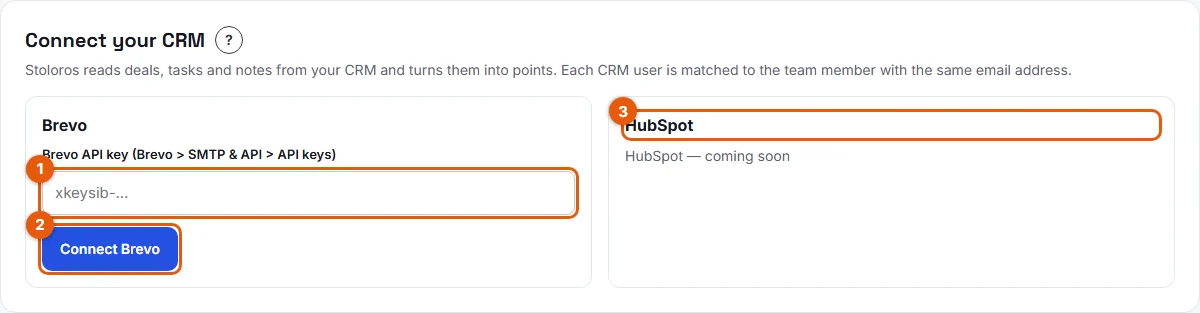
- In Stoloros, open Manager area. Find the Connect your CRM card. You can also do this at the CRM step of the setup wizard, by choosing Brevo or HubSpot.
- Paste the key in the Brevo API key (Brevo > SMTP & API > API keys) field (number 1 on the screenshot).
- Click Connect Brevo (number 2).
- Wait for the message "Brevo is connected". Stoloros checks the key with Brevo before saving it.
Result
The card now shows Brevo CRM and the Brevo account it reads. From now on, deals created, deals moved up a stage, deals won, tasks completed and notes added in Brevo earn points for the rep who owns them. If you started with demo data, it is removed as soon as Brevo is connected.
Good to know
- Nothing that happened before the connection is counted. Points start with the actions logged after you click Connect Brevo.
- The key is stored encrypted. Stoloros only reads Brevo: it never changes your deals, tasks or notes.
- Brevo does not share calls made or meetings booked. These two criteria stay greyed out in the scoring rules. See Which actions earn points with each CRM.
- A deal counts as won when it reaches a stage whose name contains "won" (or "gagné").
- New actions are read when someone opens the leaderboard, when you click Sync now, and once a day.
FAQ
Brevo refused my key. What should I do?
Check that you copied a v3 API key from SMTP & API > API keys, with no missing characters. If the message mentions IP addresses, Brevo is blocking unknown addresses: turn off IP blocking for the API in Brevo (Security > Authorised IPs), then connect again. Details in What to do when your CRM shows an error.
Can I connect Brevo and HubSpot at the same time?
No. A team reads one CRM at a time. To switch, disconnect the current CRM first.
Will my reps get points for last month's deals?
No. Only actions logged after the connection earn points.