How to match CRM users with team members
Each CRM user is matched to the Stoloros member with the same email. Fix a rep who uses another address in the CRM.
Stoloros gives the points of a CRM action to the member whose email matches the CRM user who owns it. When a rep uses a different address in the CRM, you set that address in Team members.
Who it's for
Managers · Free plan
Before you start
- A CRM is connected to your team (see How to connect Brevo).
- Your reps are invited in Stoloros (see How to invite team members).
Steps
- Open Manager area and go to the CRM card. Look at the User matching section. It shows how many users are matched and how many members are not found in the CRM.
- Read the table. Each CRM user appears next to the Stoloros member with the same email, or with No member with this email.
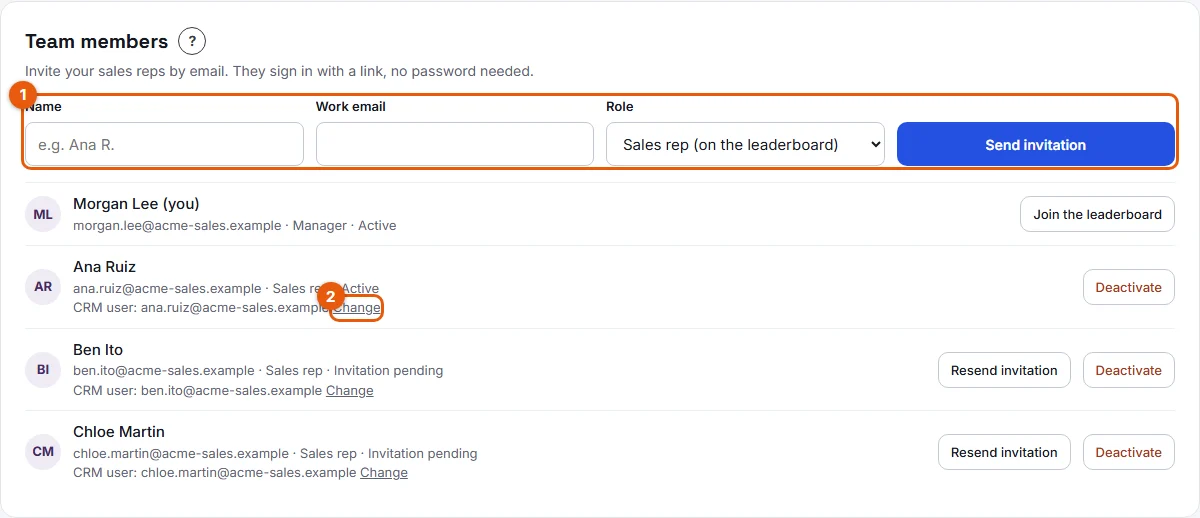
- If a member is listed as not found, go to the Team members card (number 2 on the screenshot shows the actions on a member).
- Under the member's name, find the line "CRM user:" followed by an email. Click Change.
- Type the email this rep uses in the CRM, for example ana.ruiz@acme-sales.example, then click Save.
Result
A message confirms that the member is matched to the CRM user. From the next sync, the actions this rep logs in the CRM earn points for them. The User matching section counts them as matched.
Good to know
- Matching uses only the email address. Names do not need to match.
- Points go to the owner of the deal, the person assigned to the task, or the author of the note in the CRM.
- Fix the email early. Stoloros reads new activity from the moment a member is matched.
- Only members on the leaderboard earn points. A manager earns points only after Join the leaderboard.
- A CRM user with no matching member earns nobody points. Invite them if they should be on the leaderboard.
FAQ
Ana Ruiz logs deals in Brevo but has 0 points. Why?
Her Stoloros email may differ from her Brevo email. Check the User matching section, then set her CRM email in Team members.
Do I need to fix anything if the emails are the same?
No. Matching is automatic when the addresses are identical.
Can I set the CRM email before connecting the CRM?
Yes. The "CRM user:" line is shown in Team members for every active member on the leaderboard.