How to start when your CRM is not supported yet
Use Salesforce, Pipedrive, Zoho CRM, Odoo or another CRM? Ask to be notified and try Stoloros with demo data meanwhile.
Stoloros reads Brevo today, and HubSpot is coming soon. If your team uses another CRM, you can still set up Stoloros and discover it with demo data.
Who it's for
Managers · Free plan
Before you start
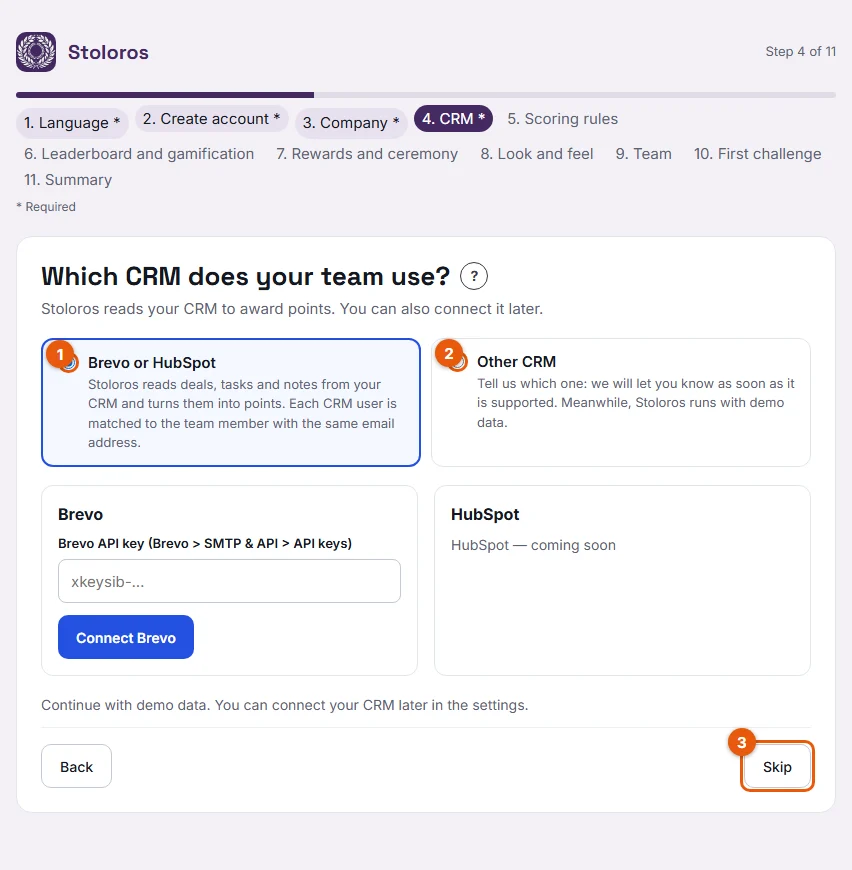
- You are at the CRM step of the setup wizard (step 4 of 11).
Steps
- At the CRM step, choose Other CRM (number 2 on the screenshot).
- In Your CRM, pick yours: Salesforce, Pipedrive, Zoho CRM, Odoo or Another CRM.
- In Email to notify, enter the address that should hear from us when your CRM is supported.
- Click Notify me and continue.
Not sure yet? Click Skip for now (number 3) instead. Stoloros also starts with demo data.
Result
The setup wizard moves on. In the Summary step, the CRM line shows your choice, for example "Pipedrive (we will notify you)", or "Demo data for now" if you skipped.
When you click Launch Stoloros, the leaderboard is filled with 35 days of simulated activity for the reps you invited. The leaderboard header shows demo data so nobody mistakes it for real results.
Good to know
- Demo data gives your team a feel for the leaderboard, the arrival animation, the points breakdown and the action log. In the action log, simulated actions carry the "D" icon.
- Demo data is removed as soon as you connect a CRM. Real points then start from the connection.
- You can connect Brevo at any time from the Manager area, in the Connect your CRM card.
- Demo actions are not real activity. Do not use them to judge your reps.
FAQ
When will my CRM be supported?
We do not announce dates. We will write to the email you entered as soon as your CRM is supported.
Can my reps use Stoloros with demo data?
Yes. They can sign in, read the leaderboard and see how points work. Their real CRM activity does not earn points until a supported CRM is connected.
I skipped the CRM step. Can I connect Brevo later?
Yes. Open Manager area and use the Connect your CRM card. See How to connect Brevo.