How to invite team members
Invite sales reps and other managers by email, from the Team members card or during setup.
Your team joins Stoloros by invitation. Each person receives an email with a link, and signs in without a password.
Who it's for
Managers · Free plan
Before you start
- Use each person's work email, ideally the same address as in your CRM. Stoloros matches CRM users to members by email.
- Invitations are sent in your team's language.
Steps
From the Manager area
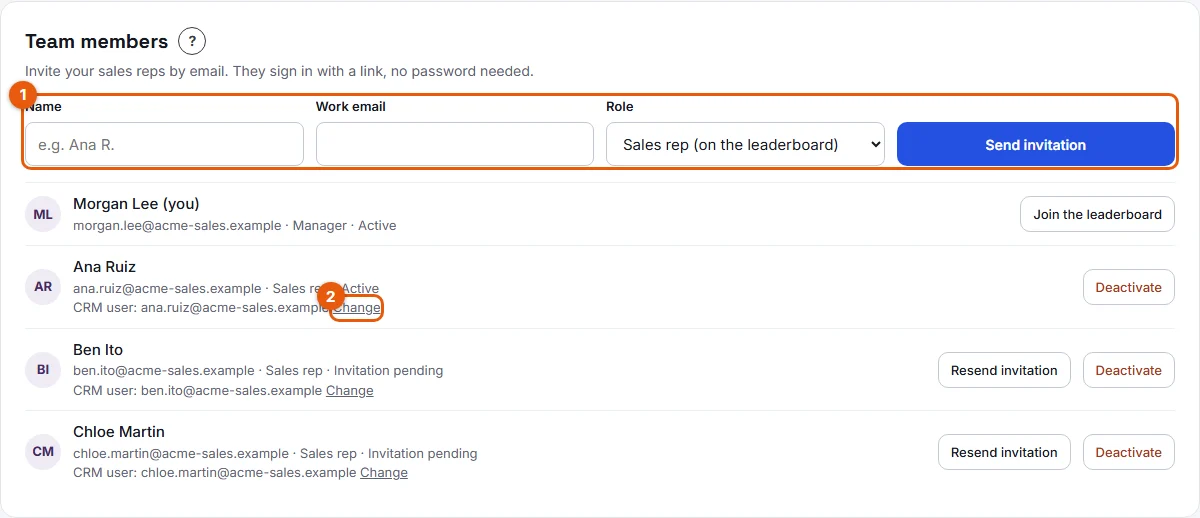
- Open Manager area from the top menu and go to the Team members card.
- In the invitation form (marked 1), fill in Name and Work email.
- Choose the Role: Sales rep (on the leaderboard) or Manager.
- Click Send invitation.
During setup
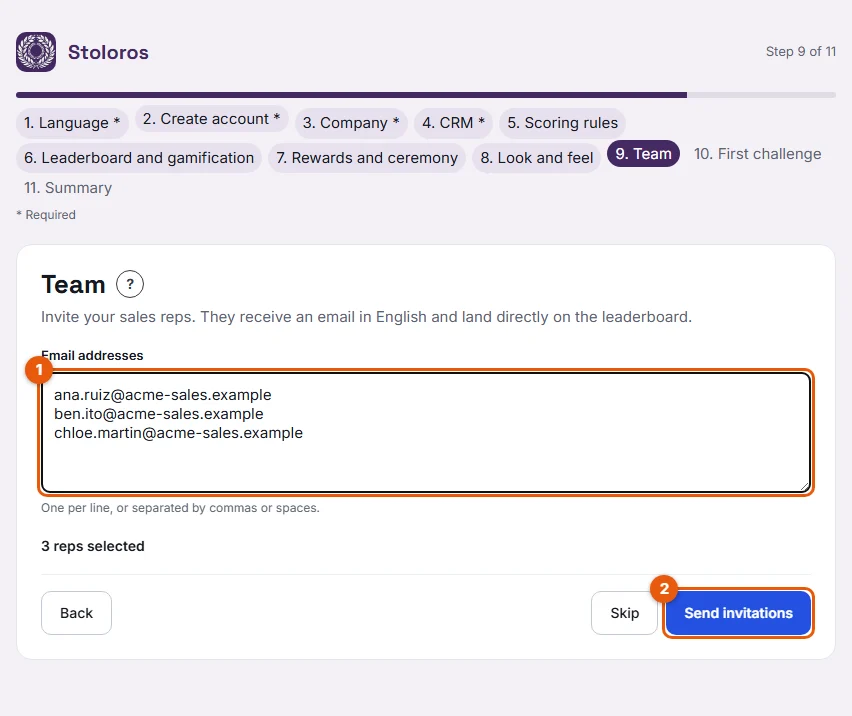
- On the Team step of the setup wizard, paste the addresses in Email addresses (marked 1): one per line, or separated by commas or spaces.
- If your CRM is connected, you can also tick its users in the list, or click Select all.
- Click Send invitations (2).
Result
The message "Invitation sent to … The link is valid for 7 days." appears. The person shows in Team members with the status Invitation pending. They receive the email "You're invited to Acme Sales on Stoloros" with a Join the leaderboard button. Once they accept, their status becomes Active.
Good to know
- The invitation link is valid for 7 days. To send a new one, click Resend invitation (marked 2 on the screenshot). Only pending invitations can be sent again.
- Invited sales reps land directly on the leaderboard. They do not go through the setup wizard.
- In the setup wizard, addresses that already have a Stoloros account are skipped.
- On the Team step, if you invite more than 5 sales reps, a message explains the paid plan. Nothing is charged today. See Plans and billing.
FAQ
I see "This email address already has a Stoloros account".
This person already belongs to a Stoloros team. One email address can have only one account.
The person never received the email.
Ask them to check their spam folder, then click Resend invitation. Check the address in Team members: if it is wrong, deactivate this invitation and invite the right address.
Can I invite another manager?
Yes. Choose Manager as the role. A manager has access to the Manager area and is not on the leaderboard unless they join it. See Roles and permissions.