Why are my points missing?
An action in your CRM did not earn points? Check the usual causes, from daily caps to email matching.
You logged an action in your CRM but your points did not move. Most of the time, one of the causes below explains it.
Who it's for
Managers and sales reps · Free plan
Before you start
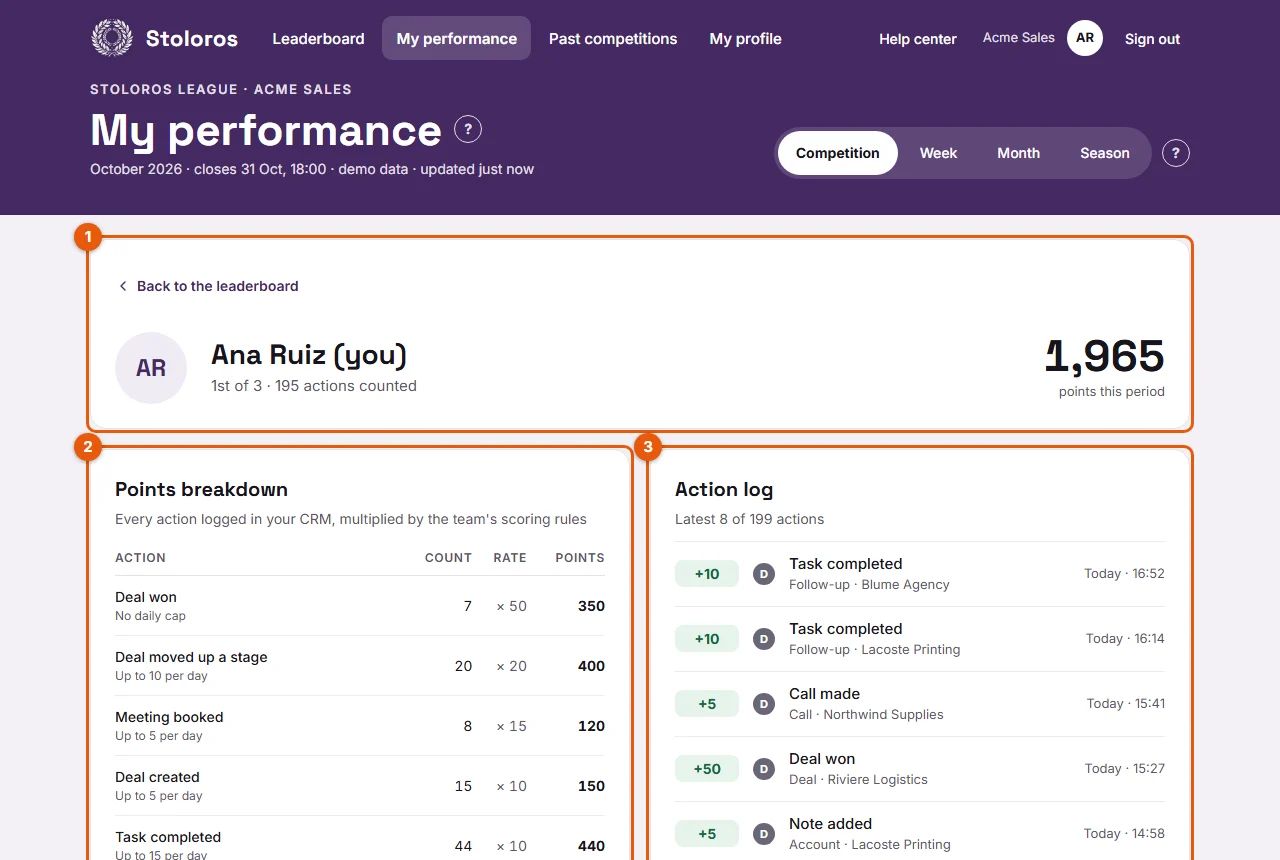
- Open My performance and look at the Action log (number 3 on the screenshot). If the action is there, it was read: the log tells you why it did or did not earn points.
How it works
The CRM has not been read yet
Stoloros reads the CRM when someone opens the leaderboard (at most every 2 minutes), when a manager clicks Sync now, and once a day. Fix: wait 2 minutes and open the leaderboard again. A manager can click Sync now in the Manager area.
The daily cap was reached
Each action type has a daily cap. Beyond it, the action is logged with Daily cap reached, not counted. For example, with the default rules, only 20 calls per day earn points. Fix: nothing to repair. The cap resets the next day, in your team's time zone. See Daily caps.
Your CRM email differs from your Stoloros email
Points go to the member whose email matches the CRM user who owns the deal, task or note. Fix: the manager sets the right address with the "CRM user:" line and Change in Team members. See How to match CRM users with team members.
The action happened before the CRM was connected
Nothing logged before the connection is counted. Fix: none. Only actions from the connection onwards earn points.
Your CRM does not provide this action
Brevo does not share calls made or meetings booked. In the scoring rules they show Not available from Brevo: no points until this data can be read. Fix: a manager can reward them by hand. See Which actions earn points with each CRM.
The deal is in a pipeline that does not earn points
A manager may have unticked some pipelines in Pipelines that earn points. Fix: the manager ticks the pipeline again. See How to sync your CRM and choose pipelines.
The won stage is not recognised
In Brevo, a deal counts as won when its stage name contains "won" (or "gagné"). A stage named "Signed" is not recognised as won. Fix: rename the stage in Brevo, for example "Won – signed".
The action counts in the next competition
An action dated before a competition closed, but read after the closing, counts in the next competition. The log shows Received after the previous competition closed: counted in this one. Fix: none. Look at the Competition tab of the new competition.
You are not on the leaderboard
Only members on the leaderboard earn points. A manager must click Join the leaderboard first.
Good to know
- Your total always equals the sum of the Points breakdown and of the Action log.
- A change in the scoring rules applies only to actions logged afterwards.
FAQ
Can a manager add the missing points?
Yes, with a manual award from the Manager area. It appears as a manager bonus.
Ben Ito's points dropped. Is that a bug?
Probably not. A manager may have cancelled an award: the log keeps a line for the cancellation.