How to change the theme, colors and logo
Give the leaderboard your team's look: a board theme, a main color, a podium color and your company logo.
The leaderboard is the screen your team sees most. You can dress it like a sports club, a school honor roll or a race, in your own colors and with your logo. The look applies to the whole team.
Who it's for
Managers · Free plan
Before you start
- You are signed in as a manager.
- To add a logo, have a PNG, JPG or SVG file under 2 MB ready.
Steps
- Open Manager area and scroll to Settings > Leaderboard look.
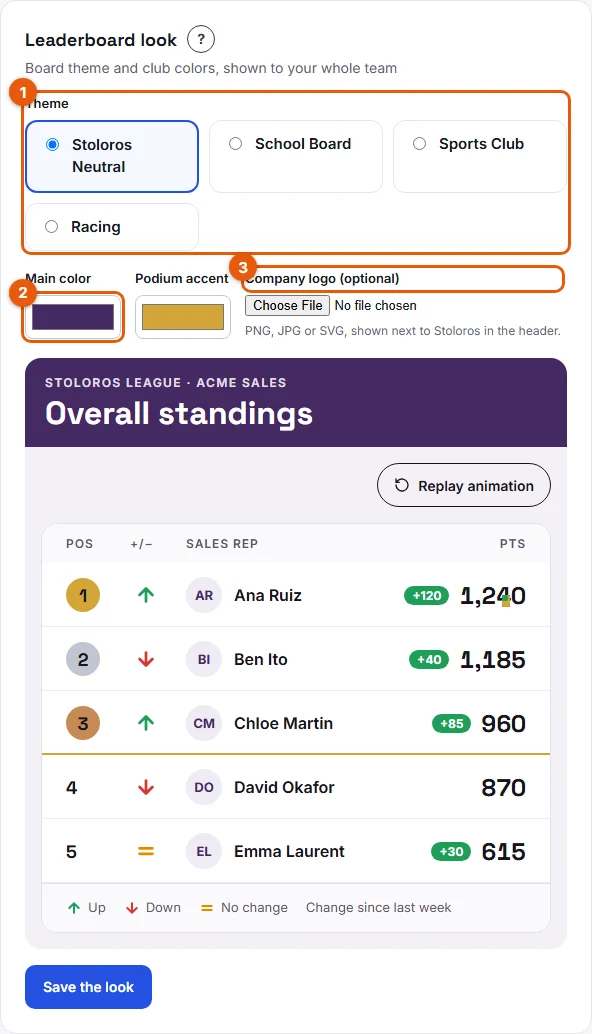
- Under Theme (1 on the screenshot), choose a board theme:
- Stoloros Neutral: clean and sober, the default.
- School Board: an honor roll.
- Sports Club: a championship table.
- Racing: race standings.
- Pick a Main color and a Podium accent (2). Each opens a color picker.
- Under Company logo (3), choose your file. It appears next to Stoloros in the header. To take it off, click Remove the logo.
- Watch the live preview below the fields. It plays the arrival animation with sample names.
- Click Save the look.
Result
A message confirms: "Saved. Your team sees the new look on their next visit." The theme and colors apply to the leaderboard, and the logo appears in the header. The closing ceremony also uses your podium accent color.
Good to know
- You can also switch theme in one click from the leaderboard: as a manager, you see the Theme buttons above the board. The change applies to the whole team.
- The default colors are Stoloros violet (#452963) for the main color and gold (#D4A537) for the podium.
- The same settings appear in the setup wizard, at the Look and feel step.
- Sales reps cannot change the look. They can choose their own nickname and avatar in My profile.
- A logo over 2 MB is refused: "This image is too large. Choose a file under 2 MB."
FAQ
Can each rep choose their own theme?
No. One look for the whole team, so everyone sees the same board.
My logo looks blurry. What can I do?
Use an SVG file, or a PNG with a larger size and a transparent background, still under 2 MB.
Do the themes change the points or the ranking?
No. Themes only change the look. Points, positions and arrows stay the same.