How to choose your team's language
Pick English or French for the whole team: screens and emails switch for every member.
Stoloros is available in English and French. The language belongs to the team account: one language for every member and for every email Stoloros sends.
Who it's for
Managers · Free plan
Before you start
- English is the default language.
- Only a manager can change the team's language.
Steps
During setup
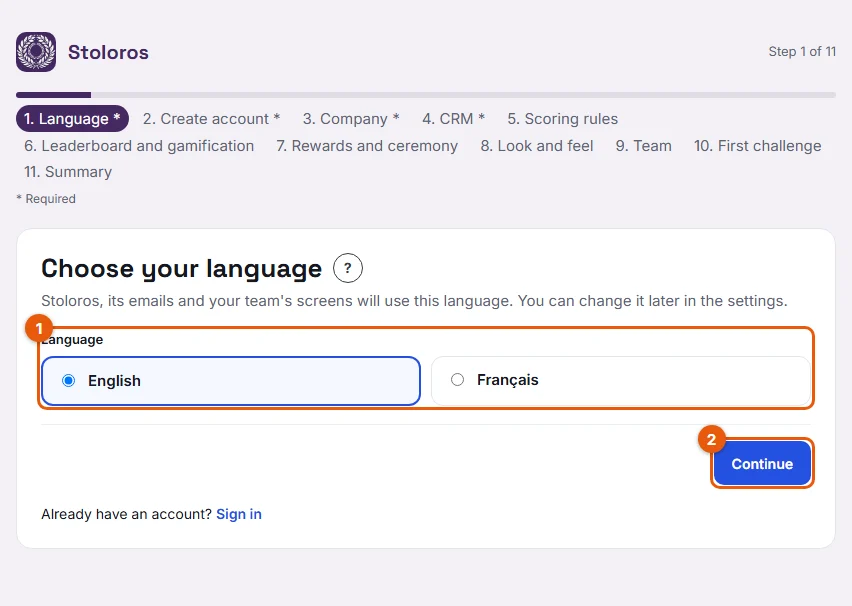
- On the first step of the setup wizard, Language, click English or Français (the cards marked 1).
- Click Continue (2).
Later, in the settings
- Open Manager area from the top menu.
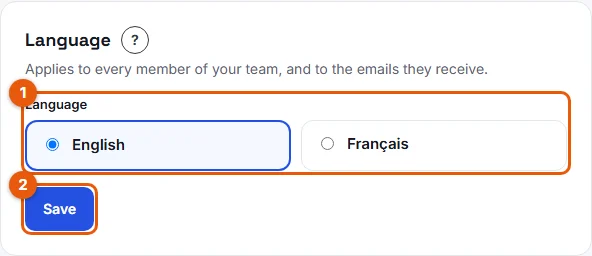
- Scroll down to Settings, card Language.
- Choose English or Français (marked 1).
- Click Save (2).
Result
The message "Language updated for the whole team." appears, already in the new language. The change applies at once: every member sees Stoloros in this language at their next page load, and the next emails (invitations, sign-in links) use it too.
Good to know
- There is one language per team. A member cannot choose a different language for themselves.
- Text typed by people is not translated: the team name, challenge names, announced rewards and award notes stay as written.
- Before signing in, the English and Français buttons on the Sign in page only change the language of that page. Your browser remembers this choice.
FAQ
Can some reps use English and others French?
No. The language applies to the whole team.
Will invitations already sent change language?
No. An email keeps the language it was sent in. If needed, resend the invitation from Team members with Resend invitation.
Can I change the language before launching Stoloros?
Yes. In the setup wizard, use the progress bar to go back to the Language step, or click Change next to the language on the Summary step.