How to set your company settings
Set your company name, team size, time zone and first day of the week, during setup or later.
The company settings tell Stoloros who your team is and when its days and weeks start. You fill them in on the Company step of the setup wizard, and you can change them at any time.
Who it's for
Managers · Free plan
Before you start
- The Company step is one of the 4 required steps of the setup wizard.
- Check the time zone carefully: it drives the daily caps and the competition closing times.
Steps
During setup
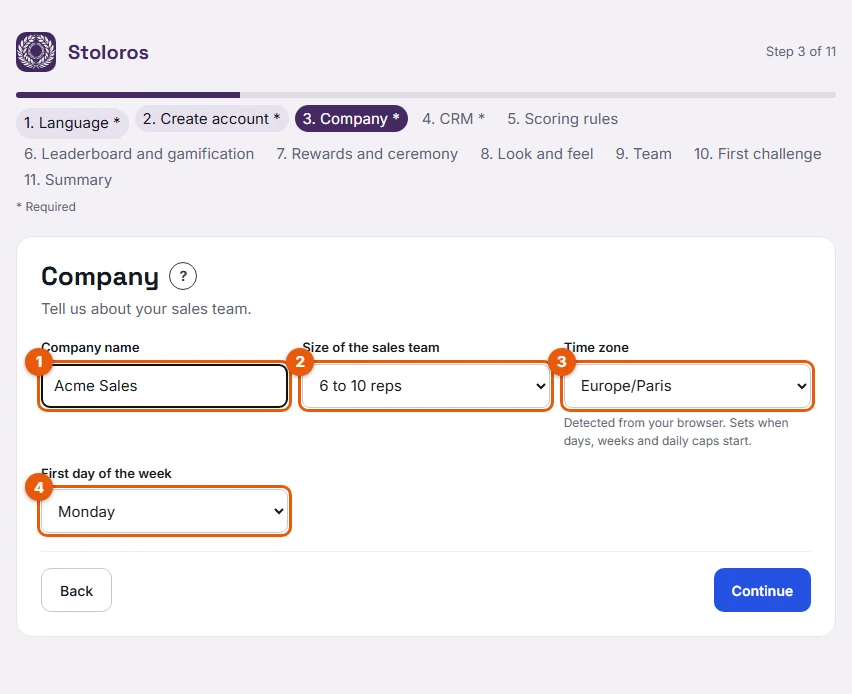
- On the Company step, fill in Company name (marked 1). It starts as "{your name}'s team", for example "Ana Ruiz's team". Replace it with your company name, such as Acme Sales.
- Choose the Size of the sales team (2), from 1 to 5 reps to More than 50 reps.
- Check the Time zone (3). Stoloros detects it from your browser; change it if your team works in another time zone.
- Choose the First day of the week (4): Monday or Sunday.
- Click Continue.
Later, in the settings
- Open Manager area from the top menu.
- Scroll down to Settings, card Company.
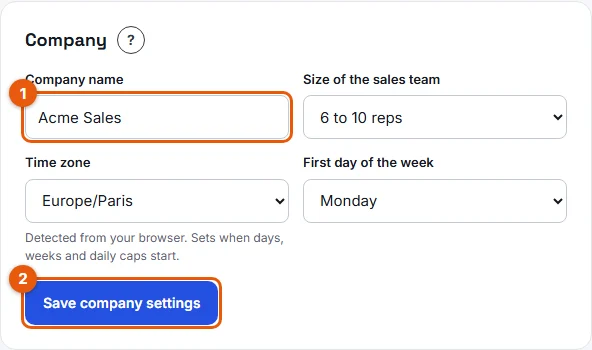
- Change the fields (marked 1).
- Click Save company settings (2).
Result
The new settings apply to the whole team:
- The company name appears at the top of the leaderboard and in the emails Stoloros sends.
- Days, weeks and daily caps start at midnight in the chosen time zone.
- The Week tab of the leaderboard starts on the chosen first day of the week.
Good to know
- Competition closing times also follow the team time zone. For example, with the default schedule, a weekly competition closes on Friday at 18:00 in your time zone.
- A rep in another time zone still follows the team time zone for daily caps.
- The company name must have at least 2 characters.
FAQ
My team is spread over two time zones. Which one should I pick?
Pick the time zone where most of the team works, or the one of the head office. One time zone applies to the whole team.
Does the team size limit the number of reps I can invite?
No. It only describes your team. See Plans and billing for the announced plans.
What happens to the Week tab if I switch from Monday to Sunday?
The week tab then runs from Sunday to Saturday. Points already earned are not lost.