How to create your Stoloros account
Create your team in two steps: choose the language, then enter your name and work email to receive a sign-in link.
Creating an account creates your team, and you become its manager. It takes the first two steps of the setup wizard and needs no password.
Who it's for
Managers · Free plan
Before you start
- Use your work email address. Stoloros later matches CRM users to team members by email.
- Keep your inbox open: the sign-in link expires after 15 minutes.
Steps
- Go to app.stoloros.com. On the Sign in page, under New to Stoloros?, click Create your team.
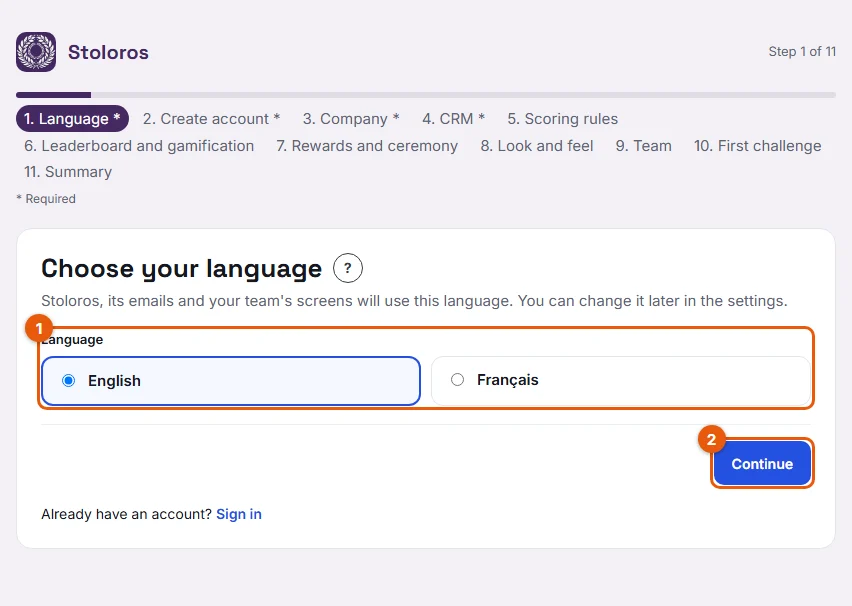
- On the Language step, click English or Français (the cards marked 1), then click Continue (2). This language applies to the whole team and to its emails.
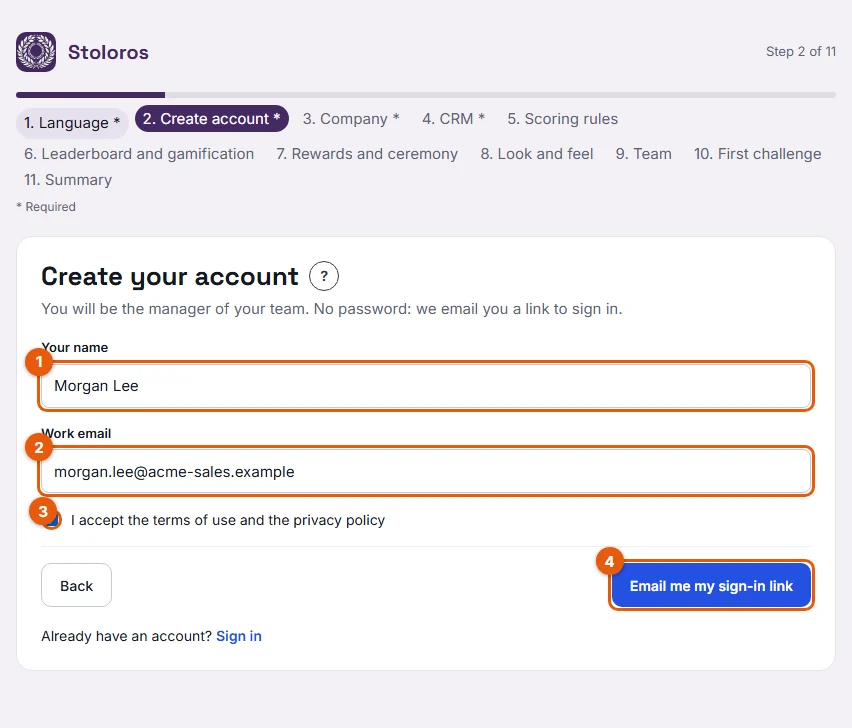
- On the Create account step, fill in Your name (1) and Work email (2).
- Tick I accept the terms of use and the privacy policy (3). This box is required.
- Click Email me my sign-in link (4).
- Open the email "Your Stoloros sign-in link" and click Sign in to Stoloros.
- On the Welcome to Stoloros page, click Continue to Stoloros.
Result
You are signed in as the manager of your new team. The setup wizard continues at the Company step. Your team name starts as "{your name}'s team", for example "Ana Ruiz's team"; you can change it on that step.
Good to know
- No password, ever. Each time you sign in, Stoloros emails you a new link.
- A sign-in link works once and expires after 15 minutes.
- You can ask for at most 5 links in 15 minutes.
- The setup is saved step by step. If you stop, you go back to the step you reached at your next sign-in.
FAQ
I did not receive the email. What can I do?
Check your spam folder. Wait a minute, then ask for a new link from the Sign in page. If you asked for 5 links in a short time, wait 15 minutes.
What happens if my email already has a Stoloros account?
No new team is created. Stoloros sends a sign-in link to your existing account instead.
Can I use a personal email address?
Stoloros accepts any valid address. We recommend your work email, the one you use in your CRM: if you join the leaderboard later, your CRM actions are matched to you by this address.