How to choose the leaderboard columns and turn kudos on or off
In a project team, choose which columns the leaderboard shows; in every team, turn kudos between teammates on or off.
A project team's leaderboard shows, for each member, the tasks completed, the share delivered on time, unblocks, milestones and kudos received, next to the points. You choose which of these columns to show, and whether the team uses kudos.
Who it's for
Managers · Free plan
Steps
- Open Manager Area and scroll to Settings > Leaderboard and kudos.
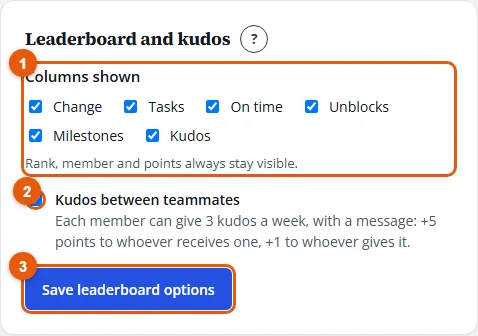
- Under Columns shown (project team only), tick the columns to show and untick the others.
- Tick or untick Kudos between teammates.
- Click Save leaderboard options.
Result
"Saved." confirms it. The leaderboard shows the chosen columns at the next visit, and the Kudos buttons appear or disappear for the whole team.
Good to know
- Rank, member and points always stay visible.
- On a narrow screen, the extra columns are hidden to keep the names readable.
- Kudos are on by default in a project team and off in a sales team. In a sales team, kudos earn no points.