How to give kudos to a teammate
Thank a colleague from the leaderboard with a short message: three kudos a week, one per colleague, and points for both of you in a project team.
Kudos let you thank a colleague for their help with a short message. They are on by default in a project team, and the manager can turn them on in a sales team.
Who it's for
Everyone · Free plan
Before you start
- Kudos must be on for your team. See How to choose the leaderboard columns and turn kudos on or off.
Steps
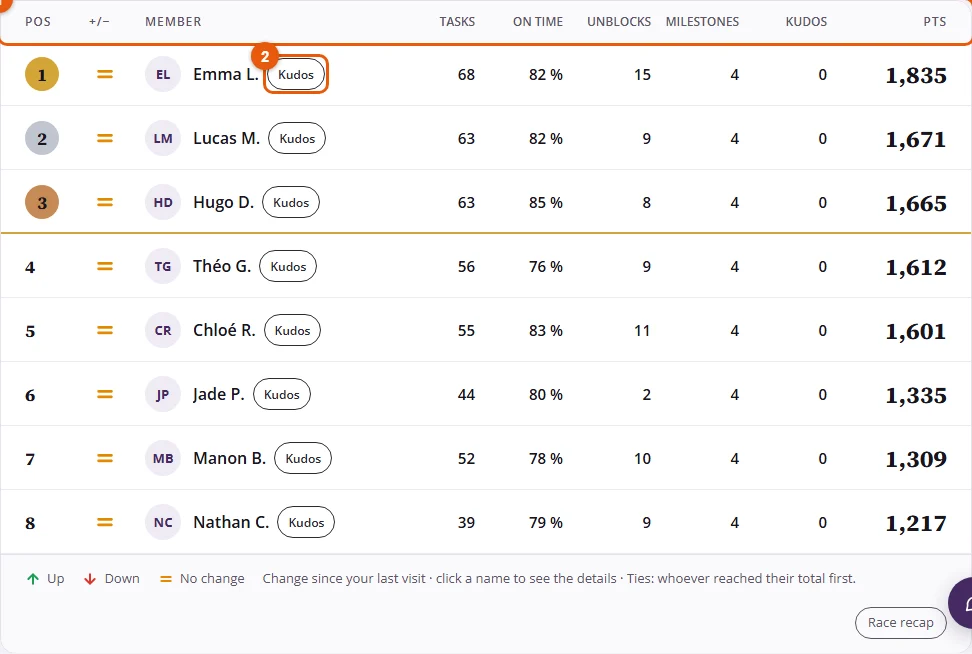
- Open Dashboard. On the line of the colleague you want to thank, click Kudos.
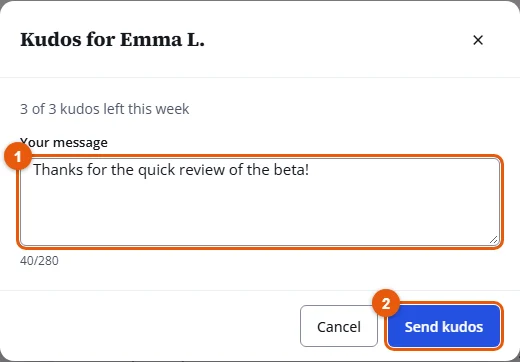
- Write Your message (up to 280 characters), then click Send kudos.
Result
"Kudos sent to Emma L." confirms it. Your colleague gets a notification, and the kudos appears in Team kudos under the leaderboard.

Good to know
- You can give 3 kudos a week, and one per colleague each week. The counter under the leaderboard shows how many you have left.
- You cannot give kudos to yourself. Once you have thanked a colleague this week, their Kudos button is greyed out.
- In a project team, each kudos earns +5 points to the person who receives it and +1 to the person who gives it. In a sales team, kudos earn no points.
- Keep it kind: a message with insults, sexual content or harassment is refused.