How to send celebration animations by email
Choose, for each moment (deal won, competition won, manager award…), who receives the animated GIF of the AI animation by email, and how members limit these emails.
When a moment of the leaderboard has an AI animation to show, Stoloros can email it: a deal won by Ana reaches the whole team with her victory animation, as an animated GIF. A click on the GIF or on View in Stoloros opens the animation in Stoloros, for signed-in members of your team only.
Who it's for
Managers choose who receives each email; every member chooses how they receive them · Paid plan (AI animations)
Before you start
- The moment has an AI animation: the member's victory animation (see How to create your victory animation), or the AI animation you assigned to the moment in the Animation Library (see How to use your team's AI animations).
- Animation emails is ticked under Emails sent to the team. See How to choose the emails sent to your team.
Steps
- Open Manager Area and scroll to Settings > Animation emails.
- For each Moment, choose Who receives the email:
- The whole team: every active member, the member concerned included (their email says "You just won a deal!").
- The member concerned: only the member who made the moment.
- Managers: managers only.
- No email: the moment is only celebrated on the leaderboard.
- Click Save. "Saved." confirms the change.
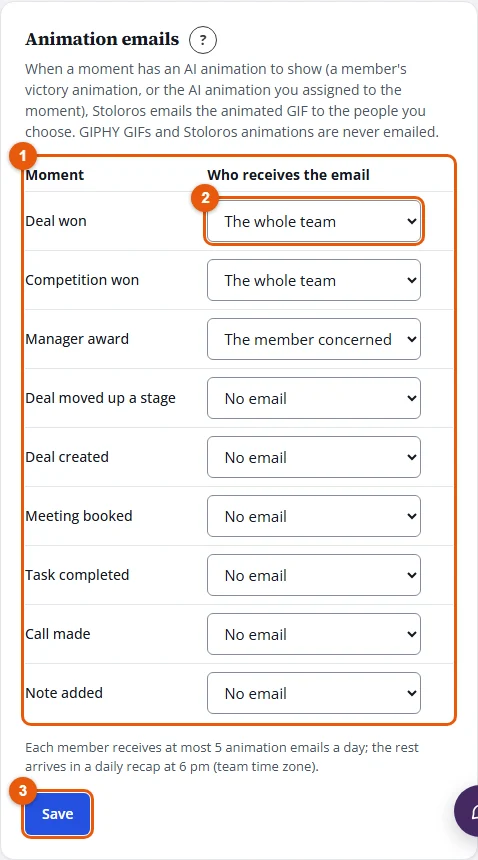
By default, Deal won and Competition won go to the whole team, Manager award to the member concerned, and the other moments send no email.
Result
At the next moment, each recipient receives an email with the title of the moment ("Ana Ruiz just won a deal!"), the animated GIF, the member's place on this month's leaderboard, a View in Stoloros button and a link to their notification preferences. Emails leave within a minute or two and appear in the Email log with the type Animation emails.
For members: choose how you receive them
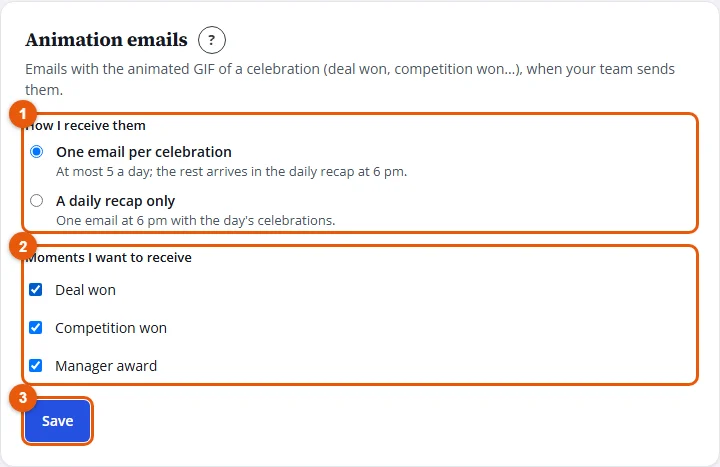
- Open My profile and scroll to the Animation emails card.
- Under How I receive them, choose One email per celebration (at most 5 a day; the rest arrives in the daily recap at 6 pm) or A daily recap only.
- Under Moments I want to receive, untick the moments you do not want.
- Click Save. "Animation email preferences saved." confirms the change.
Good to know
- Only AI animations are emailed. A GIPHY GIF or a Stoloros animation assigned to a moment plays on the leaderboard but is never sent by email.
- Each member receives at most 5 animation emails a day. The next ones are grouped in a recap sent at 6 pm, in your team's time zone.
- The author of a victory animation also receives "Your victory animation is ready" when it is generated (type My AI animation is ready).
- The page opened from the email asks to sign in; it shows the animation only to members of your team.
- An address that bounces or reports spam no longer receives animation emails.
- Only recent moments are emailed: history imported when you connect a CRM does not trigger any email.
FAQ
Nobody received the email for a deal won. Why?
Check that the moment has an AI animation (the member's active victory animation with Deal won among its moments, or an AI animation assigned to Deal won), that Deal won is not set to No email, and that Animation emails is ticked for the team. Then open the Email log.
A member says they received fewer emails than their colleagues. Why?
They may have chosen A daily recap only, unticked some moments, or reached the 5 emails of the day: the others arrive in the 6 pm recap.