How to choose the emails you receive
Turn each type of Stoloros email on or off for yourself, and decide whether teammates can send you cheers, from the Emails card of My profile.
Stoloros can email you when something happens: a cheer from a colleague, an award from your manager, a competition that closes. You choose which of these emails you want. Invitations and sign-in links are always sent, because you need them to sign in.
Who it's for
Sales reps and managers · Free plan
Before you start
- You are signed in to Stoloros.
Steps
- In the top menu, click My profile.
- Scroll to the Emails card.
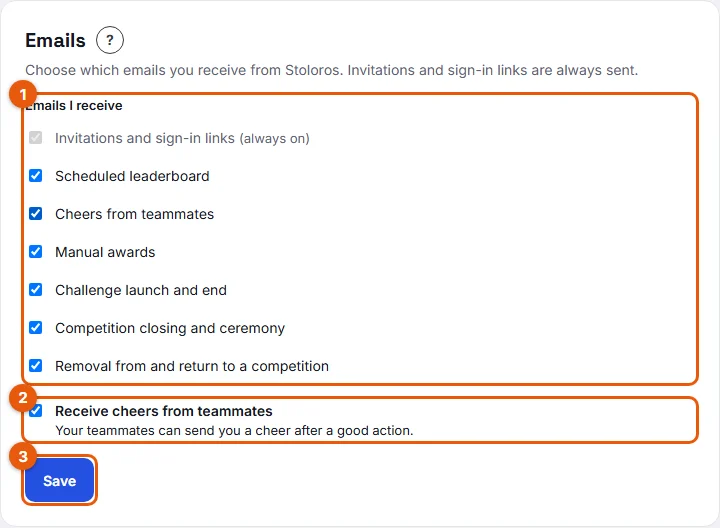
- Under Emails I receive (1 on the screenshot), untick the emails you do not want:
- Scheduled leaderboard: the team leaderboard sent on a fixed day and time.
- Cheers from teammates: an email with the animation or GIF when a colleague cheers you.
- Manual awards: when your manager awards you points.
- Challenge launch and end: when a challenge starts and when it ends.
- Competition closing and ceremony: the final standings and a link to the ceremony.
- Removal from and return to a competition: if your manager removes you from a competition or reinstates you.
- Use the Receive cheers from teammates switch (2) to decide whether colleagues can send you cheers at all. Off, nobody can cheer you, in Stoloros or by email.
- Click Save (3).
Result
"Email preferences saved." confirms the change. From now on, you only receive the ticked types.
Good to know
- Every Stoloros email, except invitations and sign-in links, has an unsubscribe link at the bottom. Clicking it turns off that type for you, exactly like unticking it here.
- A type shown greyed out with "disabled for your team" was turned off by your manager for everyone. You cannot turn it back on yourself.
- If Receive cheers from teammates is greyed out with "Cheers are disabled for your team.", your manager turned cheers off for the whole team.
- Turning off the Cheers from teammates email keeps cheers inside Stoloros: you still see them behind the Cheers button. Turning off the Receive cheers from teammates switch stops them completely.
- Emails are in the language of your team's account.
FAQ
I unsubscribed from an email by mistake. How do I get it back?
Open My profile > Emails, tick the type again and click Save.
Can I stop the invitation and sign-in emails?
No. They are the only way to sign in, so they are always sent.