How to launch a team challenge
Rally the team around one CRM habit with a target, a duration and an announced reward.
A challenge sets one target for every sales rep, for example 10 deals created in two weeks. Reps follow their progress under the leaderboard, and you follow the whole team from the Manager area.
Who it's for
Managers · Free plan
Before you start
- You are signed in as a manager.
- Pick a metric your CRM provides. With Brevo, Calls made and Meetings booked are not available, so nobody could progress on them.
Steps
- Open Manager area and go to the Challenges card.
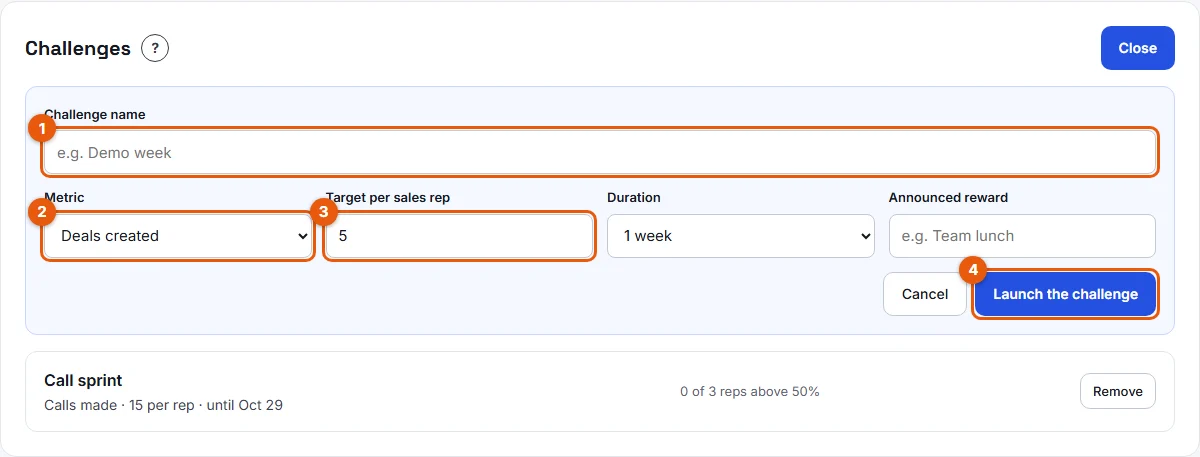
- Click Launch a challenge. A form opens.
- Fill in Challenge name (1 on the screenshot), for example "Demo week".
- Choose the Metric (2): Deals created, Deals moved up a stage, Deals won, Tasks completed, Meetings booked, Notes added or Calls made.
- Set the Target per sales rep (3), for example 10.
- Choose the Duration: 1 week, 2 weeks or 1 month.
- Optionally, type an Announced reward, for example "Team lunch".
- Click Launch the challenge (4).
From the setup wizard
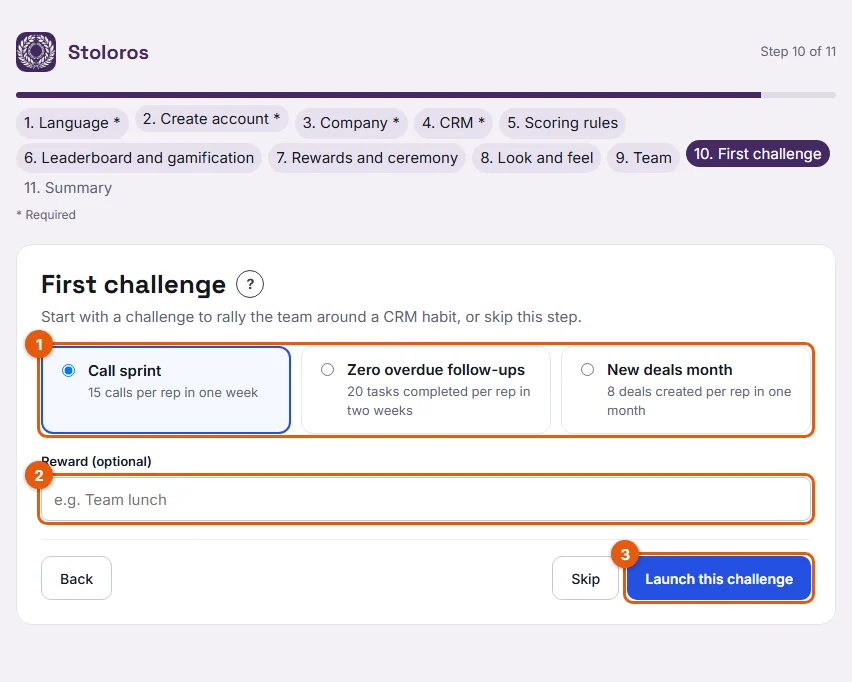
At the First challenge step, pick a template (1), add a reward if you like (2), then click Launch this challenge (3), or Skip:
- Call sprint: 15 calls per rep in one week.
- Zero overdue follow-ups: 20 tasks completed per rep in two weeks.
- New deals month: 8 deals created per rep in one month.
Result
The challenge starts today and appears in the Challenges card with its end date, the number of reps above 50% of the target and how many reached it. Reps see it under the leaderboard with their own progress bar and the days left.
Good to know
- To stop a challenge early, click Remove on its line. It disappears for everyone.
- Actions beyond a daily cap do not count towards a challenge.
- The reward is a text you announce. Stoloros does not hand it over: you do.
- The free plan, as announced, includes 1 active challenge; unlimited challenges and templates belong to the paid plan. Today, no limit is applied in the app.
FAQ
Can I change a challenge after launching it?
No. Remove it and launch a new one with the right settings.
Do challenges add points to the leaderboard?
No. A challenge tracks progress on one metric. The actions themselves earn their usual points.
Does a challenge count actions logged before its launch?
Only actions from the day it is launched count, earlier ones that same day included, until its last day.