How to check and cancel points in a project team
The points journal lists every point your project team earned from its tool; cancel a line earned by mistake, or restore it.
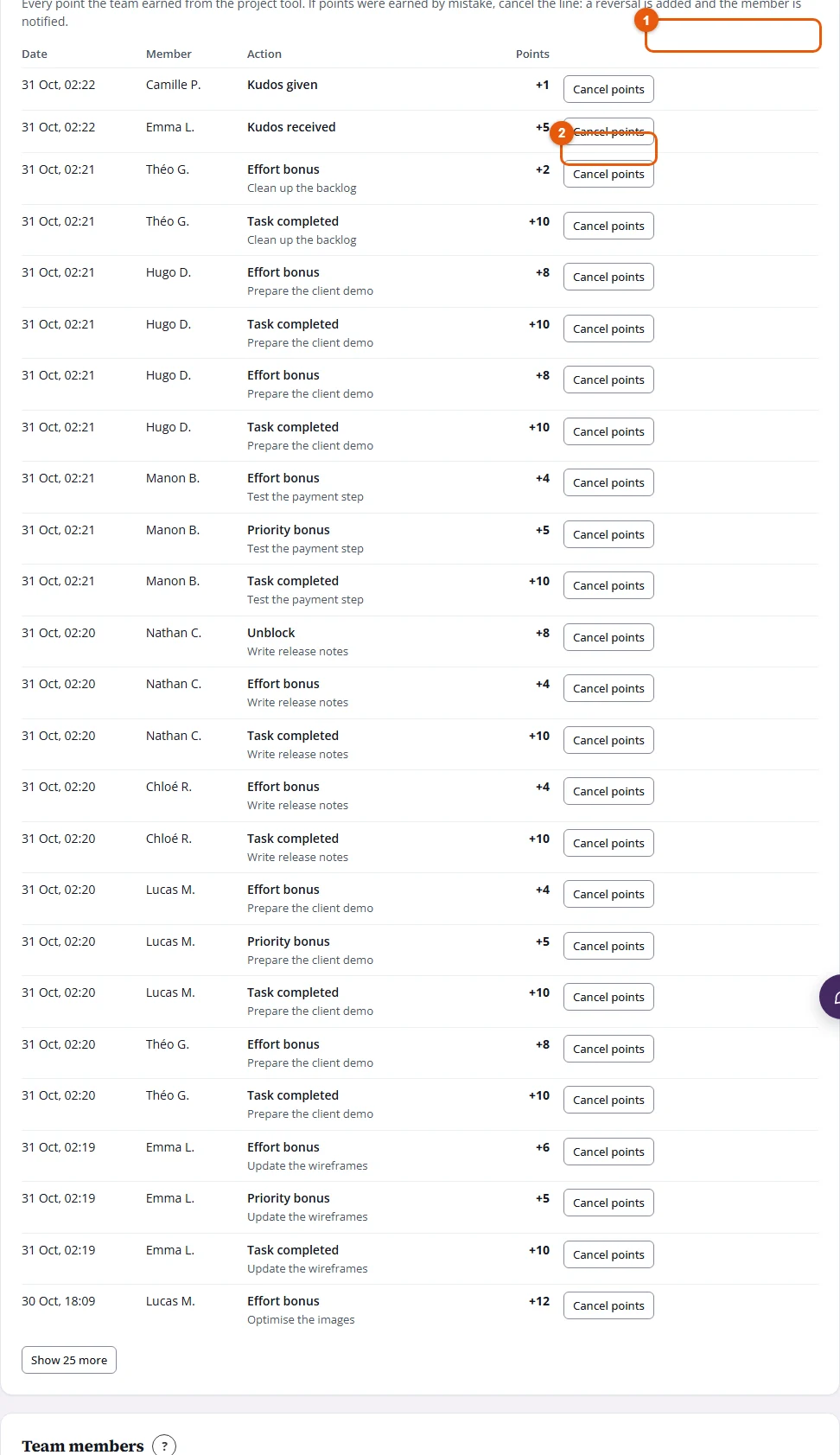
The Points journal shows each point earned by the members of a project team: completed tasks, bonuses, milestones, delivered projects, kudos. When points were earned by mistake (a duplicate task, a test task), you cancel the line.
Who it's for
Managers · Free plan
Steps
- Open Manager Area and scroll to Points journal.
- Choose the period: Week, Month or Season.
- On the line to remove, click Cancel points.
- Optionally type a Reason (optional), then click Confirm cancellation.
Result
The line shows Cancelled with your reason, and a "Withdrawn: …" line removes the points from the member's total. The member gets a notification.
Undo a cancellation
On the cancelled line, click Restore. The withdrawal disappears and the points count again.
Good to know
- Points also come off on their own when a task is reopened, deleted or moved out of scope within 7 days: the journal shows the withdrawal.
- Points you award yourself are cancelled from Award history. See How to cancel a manual award.
- A member's total always equals the sum of the lines in their journal.