How to customize the scoring rules
Set your own points and daily cap for each CRM action, then save: the new values apply to actions logged from now on.
Each action in the scoring rules has its own points and its own daily cap. Change them to reward the habits that matter most to your team.
Who it's for
Managers · Paid plan
Before you start
- You are the manager of your team.
- Your CRM is connected, so you can see which actions it provides.
Steps
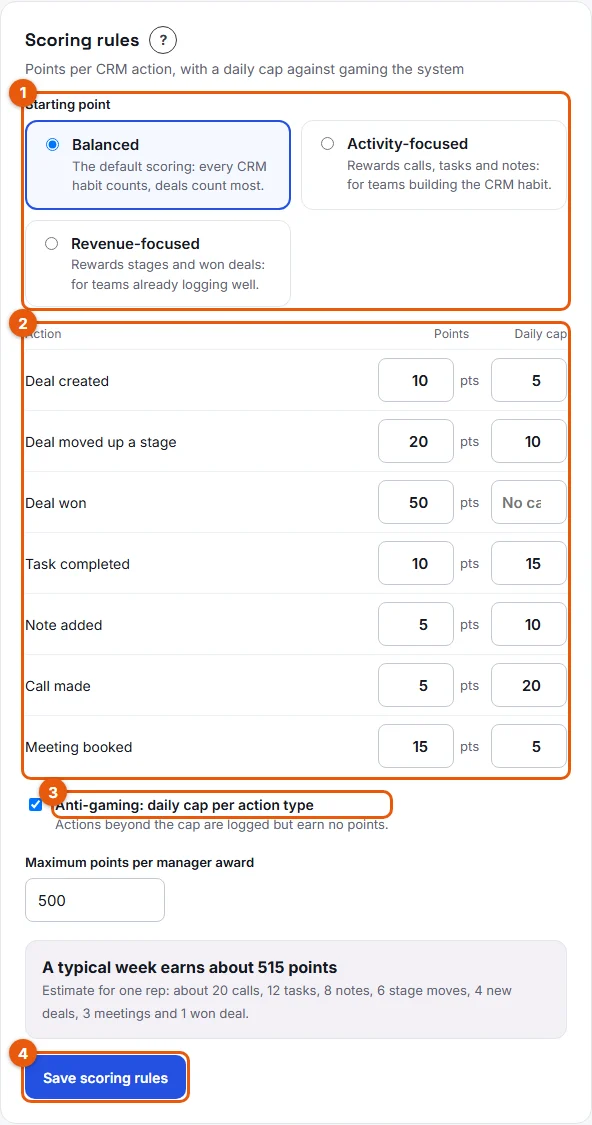
- Open Manager area, then go to Settings and find the Scoring rules card.
- Optional: under Starting point (1), pick the preset closest to what you want.
- In the table (2), type the new value in the Points column for each action you want to change. Use a whole number from 0 to 1,000.
- In the Daily cap column, type how many actions of that type can count per rep and per day, from 1 to 1,000. Leave the field empty for No cap.
- Keep Anti-gaming: daily cap per action type (3) ticked if you want the caps to apply.
- Check the estimate "A typical week earns about … points" under the table. It updates as you type.
- Click Save scoring rules (4).
Result
Stoloros confirms: "Saved. The new points apply to actions logged from now on; past points stay as they were." The preset name changes to Custom scoring.
Good to know
- Actions your CRM does not provide are greyed out, with "Not available from Brevo: no points until this data can be read". With Brevo, this applies to Call made and Meeting booked.
- Set 0 points for an action you do not want to reward.
- A change never rewrites the past. Example: on Wednesday you raise Task completed from 10 to 15 points. Tasks logged on Monday and Tuesday keep 10 points each. Tasks logged after the change earn 15. In My performance, the breakdown then shows one line per value, so count × value = points stays true on each line.
- The same card holds Maximum points per manager award (500 by default, 1 to 10,000).
- Custom scoring is part of the paid plan. Today, no payment is collected and no plan limit is applied in the app. See Plans and billing.
FAQ
Do my reps see the new values?
Yes. Each rep's Points breakdown shows the value of every action and its daily cap.
I saved but nothing changed. Why?
If you saved without changing any value, Stoloros shows "Nothing changed." Points only change for actions logged after a real change.