How to choose a scoring preset
Start from Balanced, Activity-focused or Revenue-focused, and check what a typical week earns before you save.
A preset fills in the points of all seven actions in one click. Pick the one that matches what you want your team to do more of, then read the weekly estimate.
Who it's for
Managers · Free plan
Before you start
- You are the manager of your team.
- You are in the setup wizard at the Scoring rules step, or your team is already launched.
Steps
- In the setup wizard, go to the Scoring rules step. After launch, open Manager area, then the Scoring rules card in Settings.
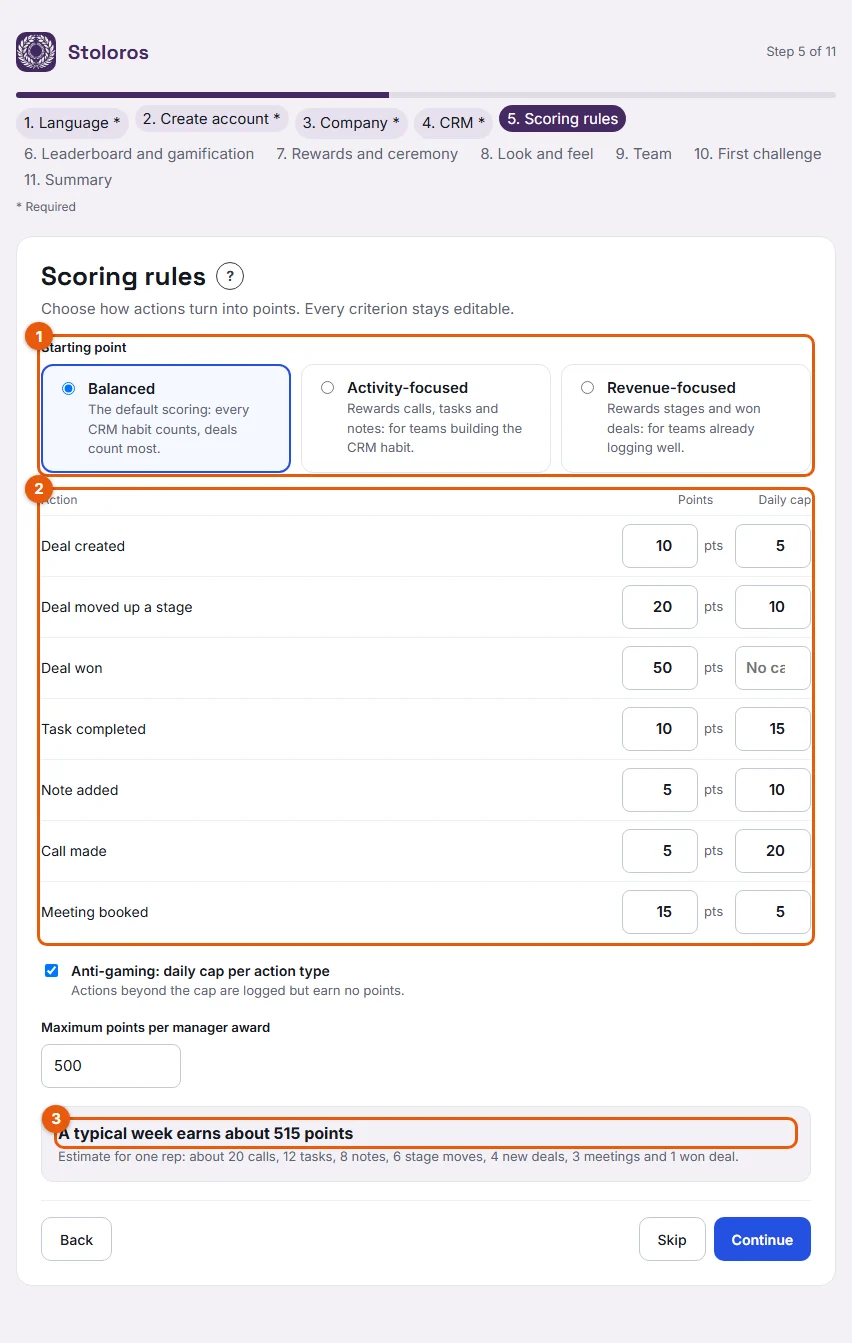
- Under Starting point (1), choose Balanced, Activity-focused or Revenue-focused.
- Check the points and daily caps in the table (2).
- Read the estimate "A typical week earns about … points" (3). The number updates with your choice.
- In the wizard, click Continue. In Settings, click Save scoring rules.
The three presets give these points per action. All three use the same daily caps.
| Action | Balanced | Activity-focused | Revenue-focused | Daily cap |
|---|---|---|---|---|
| Deal won | 50 | 30 | 100 | none |
| Deal moved up a stage | 20 | 10 | 30 | 10 |
| Meeting booked | 15 | 20 | 15 | 5 |
| Deal created | 10 | 10 | 10 | 5 |
| Task completed | 10 | 15 | 5 | 15 |
| Call made | 5 | 10 | 2 | 20 |
| Note added | 5 | 10 | 2 | 10 |
Result
The chosen preset becomes your team's scoring rules. If you change any value afterwards, the preset is shown as Custom scoring.
Good to know
- Balanced is the default: every CRM habit counts, deals count most. Activity-focused suits teams building the CRM habit. Revenue-focused suits teams already logging well.
- The typical week is one rep's week over 5 days: 20 calls, 12 tasks, 8 notes, 6 stage moves, 4 new deals, 3 meetings and 1 won deal, with daily caps applied.
- With Balanced: calls 20 × 5 = 100, tasks 12 × 10 = 120, notes 8 × 5 = 40, stage moves 6 × 20 = 120, new deals 4 × 10 = 40, meetings 3 × 15 = 45, won deal 1 × 50 = 50. Total: 515 points. Revenue-focused gives 481 points.
- Actions your CRM does not provide are left out. With Brevo, calls and meetings are excluded, so Balanced shows 370 points.
- After launch, a new preset applies to actions logged from now on. Past points stay as they were.
FAQ
Can I change preset later?
Yes, at any time in Settings. The new values apply to actions logged after you save.
Is the estimate a target for my reps?
No. It only helps you compare presets. Real points depend on what each rep logs.