Roles and permissions: manager and sales rep
Understand what managers and sales reps can do, and how a manager joins the leaderboard.
Stoloros has two roles: manager and sales rep. The manager is also the team administrator; there is no separate admin role.
Who it's for
Managers · Free plan
Before you start
What each role can do:
| Sales rep | Manager | |
|---|---|---|
| Leaderboard, challenges in progress | Yes | Yes |
| Own performance and colleagues' performance | Yes | Yes |
| Past competitions and ceremonies | Yes | Yes |
| Own profile (nickname, avatar) | Yes | Yes |
| On the leaderboard | Always | Only after joining it |
| Manager area: team dashboard, CRM, competitions, awards, challenges, team members, settings | No | Yes |
| Quick theme switch above the leaderboard | No | Yes |
Steps
Give a role
- Open Manager area and go to Team members.
- When you invite someone, choose the Role: Sales rep (on the leaderboard) or Manager.
- Click Send invitation.
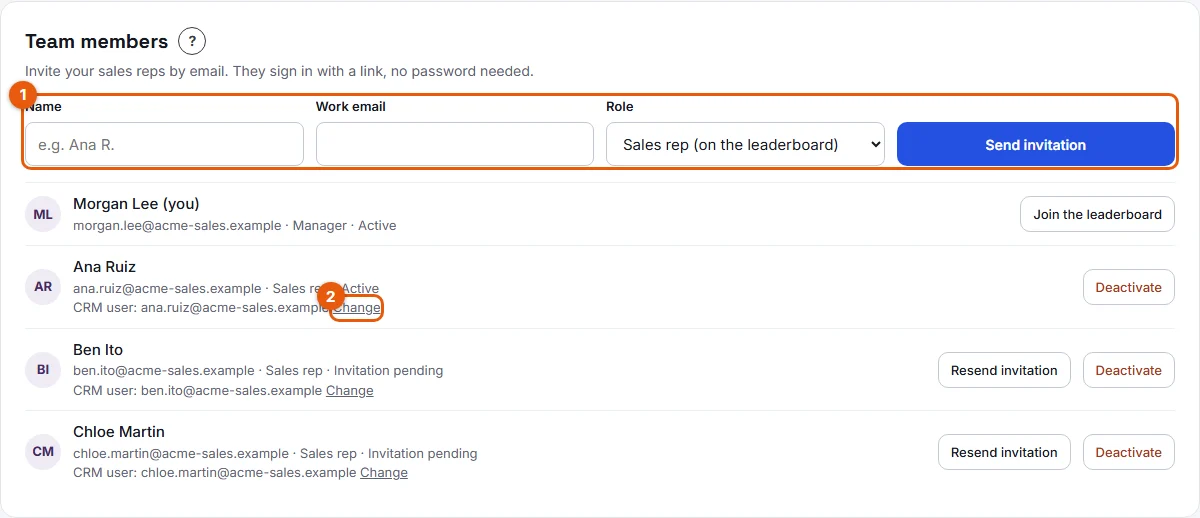
Put a manager on the leaderboard
- In Team members, find the manager's row (actions marked 2 on the screenshot).
- Click Join the leaderboard.
- To step out, click Leave the leaderboard.
Result
Each row in Team members shows the role: Sales rep, Manager, or Manager, on the leaderboard. A manager who joins sees "You are on the leaderboard. CRM actions from now on earn points."
Good to know
- Sales reps are always on the leaderboard.
- A manager who joins the leaderboard earns points from their CRM actions from that moment on, like a rep.
- When a manager leaves the leaderboard, their past actions are kept.
- A manager can join or leave for themselves or for another manager.
- The person who creates the team is its first manager. A team can have several managers.
FAQ
Can I change a member's role after the invitation?
Not from the app today. The role is chosen when you send the invitation.
Can a manager receive manager awards?
Only if they are on the leaderboard. Points can only go to members of the leaderboard.
Is there an administrator role?
No. Every manager has the same rights, including the settings.