How to set up the encouragement moment
Add a kind “Comeback next round” moment for the last places in the ceremony, and let each member opt out from their profile.
The encouragement moment is a short, warm scene at the start of the ceremony for the last places. Its message is simple: "Every point counts from today." It is kind and light-hearted, never mocking. It is off by default, and every member can choose not to appear in it.
Who it's for
Managers and sales reps · Free plan
Before you start
- Turning it on is a manager decision, in Settings > Rewards and ceremony.
- Opting out is each member's own choice, in My profile.
- Talk about it with your team first. Some people enjoy a friendly nudge; others prefer privacy. Both are fine.
Steps
Turn it on (manager)
- Open Manager area and scroll to Settings > Rewards and ceremony.
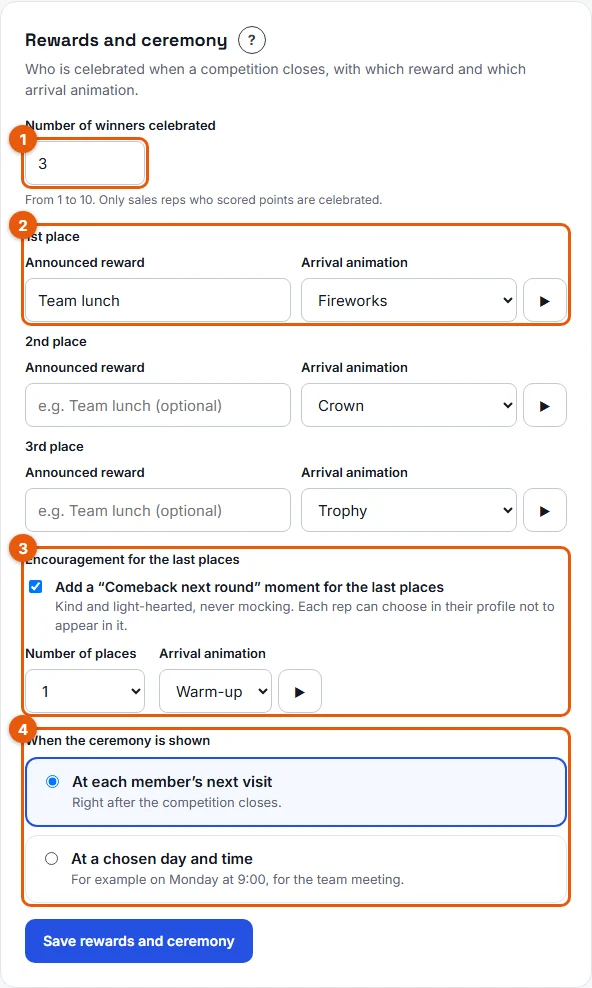
- Under Encouragement for the last places (3 on the screenshot), tick Add a “Comeback next round” moment for the last places.
- Choose the Number of places: from 0 to 3.
- Choose the Arrival animation. Only light ones are offered: Warm-up, Refuel, New day and High five. Click ▶ to preview.
- Click Save rewards and ceremony.
Opt out (any member)
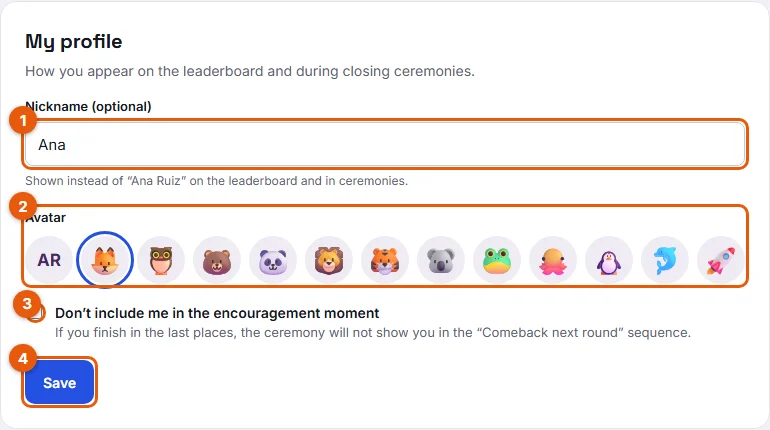
- Click My profile in the top menu.
- Tick Don’t include me in the encouragement moment (3 on the screenshot).
- Click Save.
Result
At the next closing, the ceremony opens with a Comeback next round scene before the winners: the selected reps appear with the chosen animation and the message "Every point counts from today. The next competition has already started: see you at the top!"
A member who opted out never appears in it.
Good to know
- A celebrated winner is never in the encouragement moment.
- Stoloros picks the last places among the reps who are not winners, then removes those who opted out. Nobody else is pulled in to replace them: the scene simply shows fewer people, or is skipped.
- The choice is fixed at the closing. Opting out afterwards does not change a ceremony already prepared, but applies to the next one.
- The wording and animations are designed to motivate, never to point at anyone.
FAQ
Do I need to opt out before every competition?
No. The choice is saved in your profile and applies to every future ceremony until you untick it.
I am a manager on the leaderboard. Can I opt out too?
Yes. Every member has the option in My profile.
How do I turn it off again?
Untick the option in Rewards and ceremony and save. The next ceremony goes straight to the winners.