How to remove a member from the current competition
Take someone out of the running for this competition, with an optional reason and a scope, and bring them back later with Reinstate.
Sometimes a member should not compete this time: a long training, a leave, a role that changed for a few weeks. Removing them from the competition keeps their access and their history, but their actions no longer count and they leave the leaderboard. This is different from deactivating a member.
Who it's for
Managers · Free plan
Before you start
- You are signed in as a manager.
- Check that you want a removal, not a deactivation. A deactivated member loses access to Stoloros; a removed member keeps it. See How to deactivate or reactivate a member.
Steps
Remove a member
- Open Manager area and find the Current competition card.
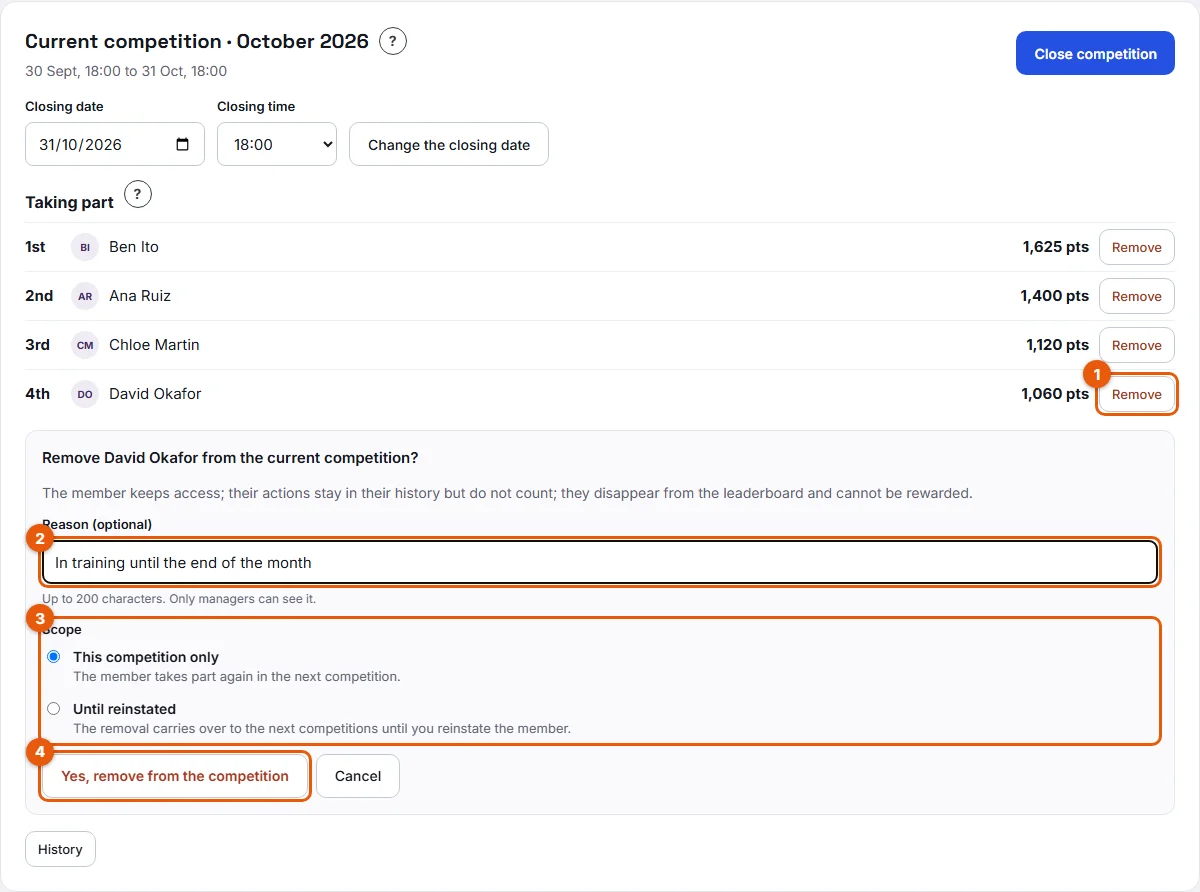
- Under Taking part, find the member's row and click Remove (1 on the screenshot).
- Optional: type a Reason (optional) (2), up to 200 characters. Only managers see it; the member never does.
- Choose a Scope (3):
- This competition only: the member takes part again in the next competition.
- Until reinstated: the removal carries over to the next competitions until you reinstate the member.
- Click Yes, remove from the competition (4).
Reinstate a member
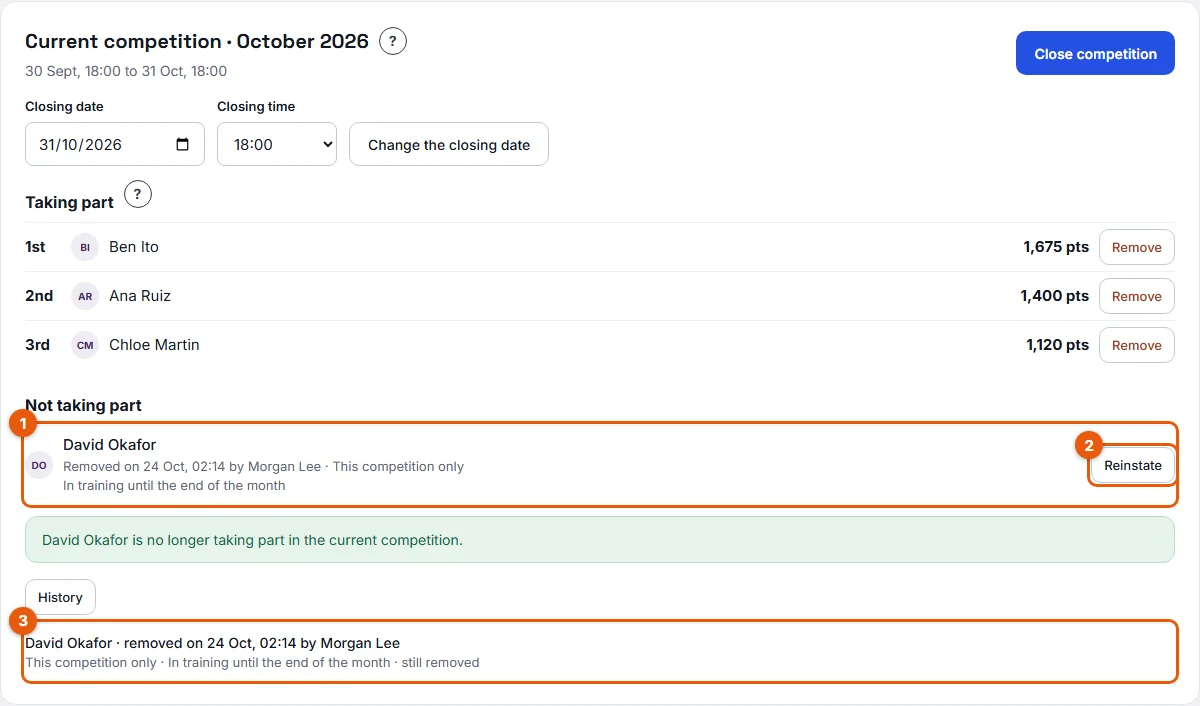
- In the same card, under Not taking part (1), find the member.
- Click Reinstate (2). Stoloros asks you to confirm and reminds you of the rule: only their actions from now on count for this competition.
- Click Yes, reinstate.
Result
After the removal, the message "… is no longer taking part in the current competition." appears and the member moves to Not taking part, with the date, your name, the scope and the reason. On their side, the member sees a banner on the leaderboard and in My performance, and receives an email if the Removal from and return to a competition emails are on.
After the reinstatement, the message "… is back in the competition. Only their actions from now on count." appears and the member is back on the leaderboard with the points earned from that moment.
Good to know
- A removed member keeps full access: leaderboard, My performance, cheers, profile. Only the competition changes for them.
- While the member is removed, every action of this competition in their action log shows +0 and Not counted (removed from the competition), including the actions from before the removal: their total for the competition shows 0. The Week, Month and Season tabs are not affected.
- A removed member cannot be rewarded at the closing and does not appear in the encouragement sequence.
- The rule after a reinstatement is "from now on": only the actions logged after the reinstatement count for this competition. The actions from before the removal and during it stay at +0, even later. This keeps the removal meaningful.
- Click History (3) to see every removal of the team, with who removed and who reinstated each member.
- The reason is for managers only. It does not appear in the email sent to the member.
- You cannot remove the same member twice for the same competition.
FAQ
Does removing a member change the other periods?
Removal applies to competitions. The Week, Month and Season tabs still count every action, for everyone.
Ben Ito was removed "Until reinstated". A new competition started. Is he back?
No. With Until reinstated, the removal is carried over to each new competition until you click Reinstate.
I removed Ana Ruiz by mistake. Will she get her points back?
Not for this competition: only her actions from the reinstatement count, so reinstate her right away to limit the loss. Her points still count in the Week, Month and Season tabs, and in her history.