How to close a competition or change its closing date
Close the current competition now after checking the final standings, or move its closing date earlier or later.
Competitions close on their own at the scheduled time. You can also close one by hand, for example at the end of a sales kick-off, or push its closing date back by a few days.
Who it's for
Managers · Free plan
Before you start
- You are signed in as a manager.
- Closing is final: the standings can no longer change, and manual awards in that competition can no longer be cancelled. Fix any award first.
Steps
Close the competition now
- Open Manager area. The Current competition card shows the name and dates, for example "Week 43, 2026".
- Click Close competition (1 on the screenshot).
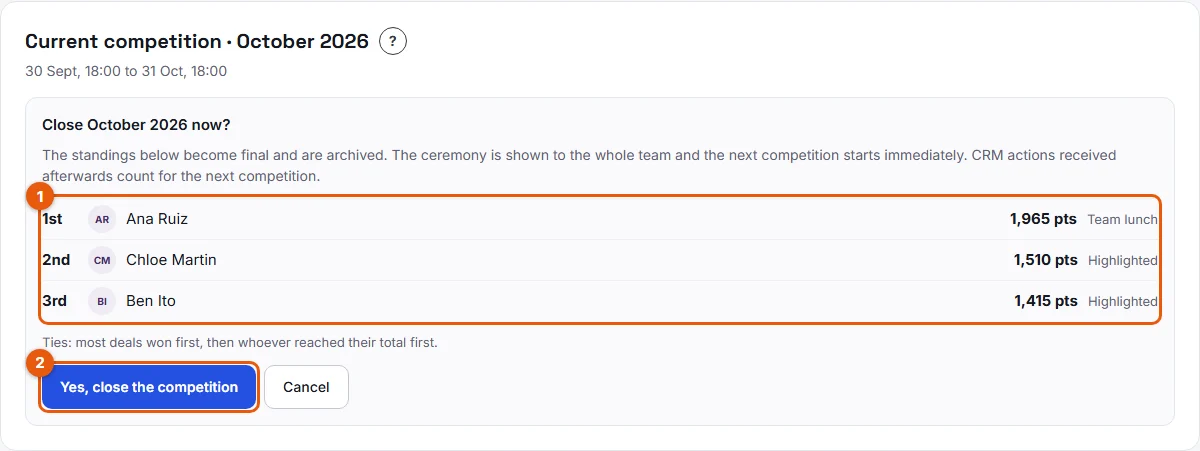
- Read the recap (1 on the second screenshot): the final standings with the reward of each celebrated place, and the tie rule.
- Click Yes, close the competition (2), or Cancel to go back.

Change the closing date
- On the Current competition card, set the new Closing date and Closing time (2 on the first screenshot).
- Click Change the closing date (3).
Result
After a manual closing, a message confirms it, for example "Week 43, 2026 is closed. The next competition has started." The standings are archived in Past competitions, and you see the ceremony right away. Members see it at their next visit or at the day and time set in Rewards and ceremony.
The next competition starts immediately and ends at the next date of your schedule. For example, if you close a weekly competition on Wednesday, the next one ends this Friday at the usual time.
After a date change, the card confirms the new closing date and time ("The competition now closes…").
Good to know
- The new closing date must be in the future and after the start of the competition.
- Moving a date only affects the competition in progress. To change every future competition, edit the schedule in Settings > Competitions.
- CRM actions received after the closing count in the next competition, even if they are dated before it.
- Places whose rep scored no points are not celebrated.
- If another manager closed the competition a moment before you, Stoloros asks you to reload the page.
FAQ
Can I reopen a closed competition?
No. Its final standings are frozen. You can still look at them in Past competitions.
Why do some places show "Highlighted" in the recap?
No reward text was set for that place. The rep is still celebrated in the ceremony.
Who decides the order when two reps have the same points?
A fixed rule: most deals won first, then whoever reached their total first. See How ties are broken.