How to read My performance
See your total, your rank, the points earned by each action and the full list of actions behind them.
My performance shows exactly how your points were earned. Nothing is hidden: every action from your CRM is listed, with the points it brought.
Who it's for
Sales reps · Free plan
Before you start
- You have joined your team's leaderboard.
Steps
- In the top menu, click My performance.
- Choose a period with the tabs at the top: Competition, Week, Month or Season (the tabs your manager chose to show).
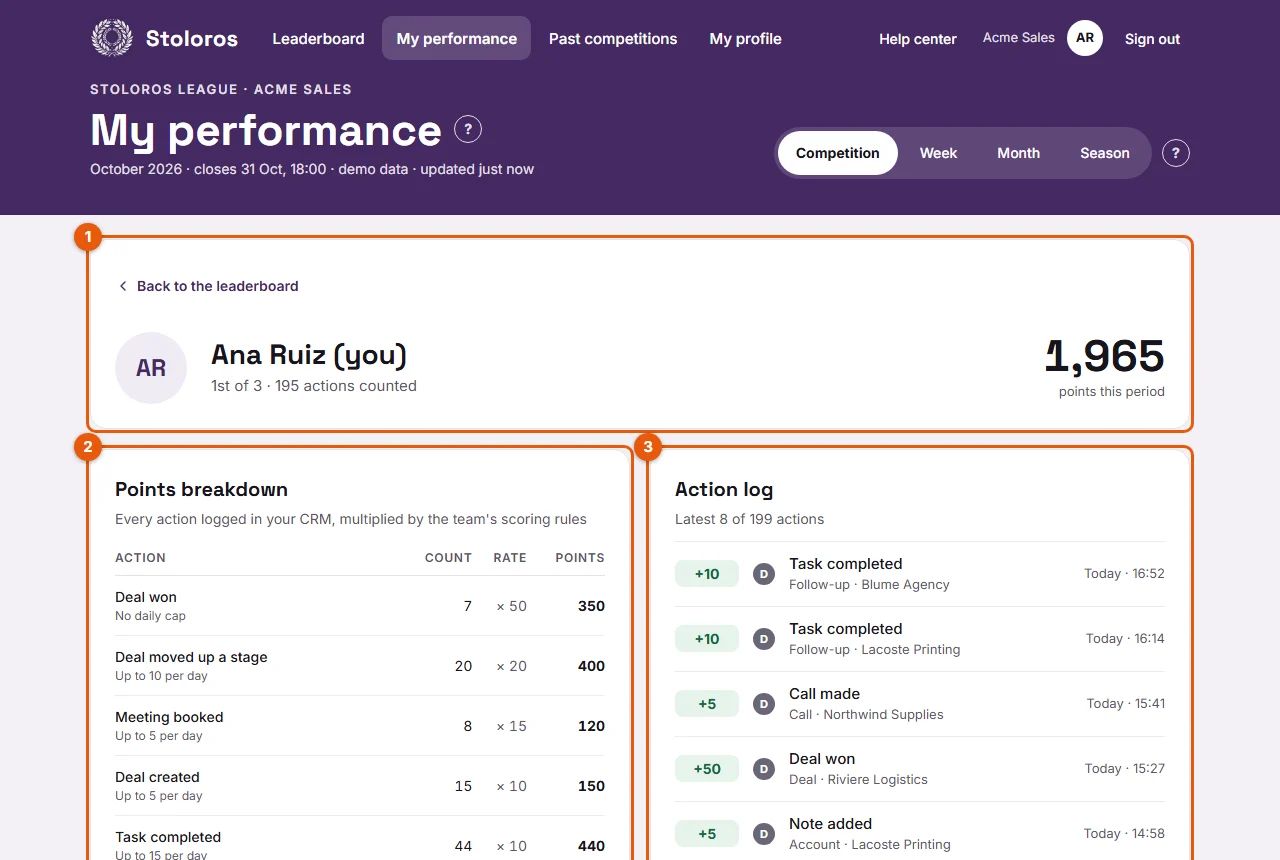
- Read your total and your rank (1). For example "1st of 3 · 22 actions counted" means you are first out of 3 reps, with 22 actions that earned points.
- Read the Points breakdown (2). Each line shows an action, how many times it counted, its value and the points: Count × Rate = Points. Under each action, you see its daily cap, for example "Up to 15 per day".
- Read the Action log (3). It lists your latest 8 actions, newest first. Click "Show all … actions" to see every action of the period.
Result
You know where each point comes from. The Total of the breakdown is always the same as the total at the top and the sum of the action log.
Good to know
- Each line of the log has a small icon for its source: B for Brevo, H for HubSpot, a star for a manager award, D for demo data.
- An action beyond its daily cap shows Daily cap reached, not counted and +0.
- A manager award shows its reason, its note and who gave it. These points appear in the Manager awards line of the breakdown, with "Points given by your manager".
- An action received after a competition closed shows "Received after the previous competition closed: counted in this one".
- If the scoring rules changed during the period, the breakdown shows one line per value, so the calculation stays exact.
- Your colleagues can open the same view for you by clicking your name on the leaderboard.
FAQ
Managers do not see My performance in the menu. Why?
The menu item is for sales reps. A manager who joined the leaderboard clicks their own name on the leaderboard to see the same view.
An action is missing from my log. What can I do?
Check that it was logged in your CRM after the connection, with the same email as your Stoloros account. See Missing points.