How to schedule the leaderboard email
Send the team leaderboard by email every week at a fixed day and time, choose the period and the recipients, test it and preview it.
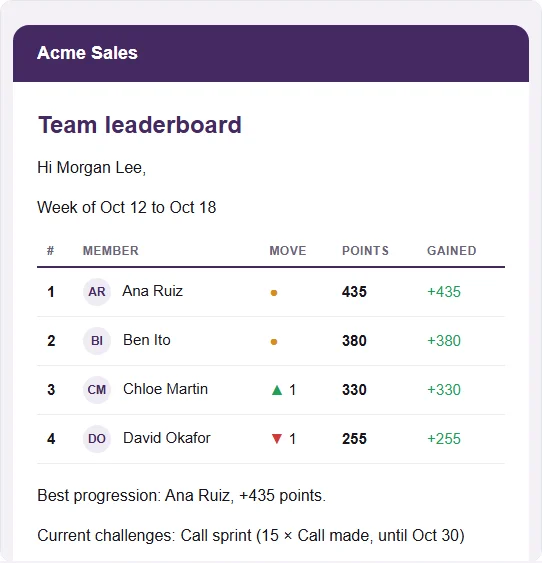
Not everyone opens Stoloros every day. The scheduled leaderboard brings the standings to the team's inbox: top 10 with avatars, arrows, points gained, best progression and the challenges in progress. Each person's own row is highlighted.
Who it's for
Managers · Free plan
Before you start
- You are signed in as a manager.
- The time zone of the team is right: Settings > Company. The email is sent at the chosen local time.
Steps
- Open Manager area and scroll to Settings > Emails.
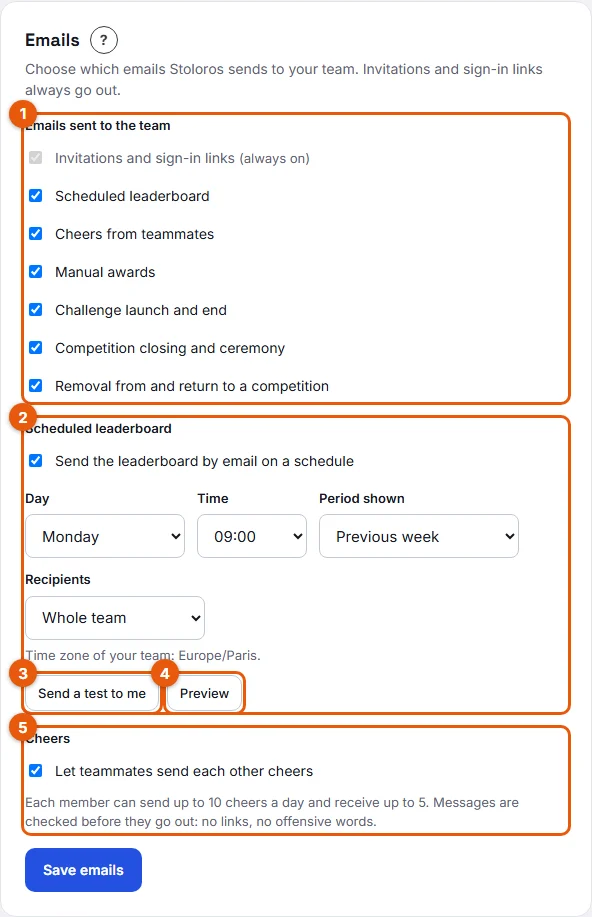
- Under Scheduled leaderboard, tick Send the leaderboard by email on a schedule (2 on the screenshot). The fields below become active.
- Choose the Day and the Time. The default is Monday at 09:00. The line under the fields reminds you of the team's time zone.
- Choose the Period shown:
- Previous week: the standings of the week that just ended, with the points gained during that week. The natural choice for a Monday email.
- Current month: the standings of the month so far, with the points gained over the last 7 days.
- Current competition: the standings of the running competition, with the points gained over the last 7 days.
- Choose the Recipients: Whole team or Managers only.
- Click Send a test to me (3) to receive the email at your own address right away, then Preview (4) to read it on the page.
- Click Save emails.
Result
On the chosen day, at the chosen time, every recipient receives the email. It is sent once per day at most, even if the service runs the schedule twice. Each sending appears in the Email log under Scheduled leaderboard.
Good to know
- The email shows the top 10. A recipient outside the top 10 gets their own row added at the bottom, highlighted.
- Members can turn this email off for themselves in My profile > Emails, or with the unsubscribe link in the email. Send a test to me still works for you, even if you unsubscribed.
- The email uses the account language and your team's colors. Avatars appear as small pictures.
- The schedule runs every hour: the email goes out during the hour you chose, not at the exact minute.
- The Scheduled leaderboard type must be ticked under Emails sent to the team, otherwise nothing is sent even if the schedule is on.
FAQ
The test says the provider is not configured. What does it mean?
Emails are recorded in the Email log with the status Simulated but not sent. The hosting of your Stoloros needs a Brevo API key. See How to read the email log.
Can I send it twice a week?
No. One day and one time per team.
Does the email change the points?
No. It only shows the standings at the time it is sent.